Ever feel like you're fighting your CRM software? You’re trying to jam your unique sales process into a system that just wasn’t built for it. That’s the reality for many businesses using standard, off-the-shelf CRM platforms.
Customized CRM software is the answer to that struggle. It’s a system that has been specifically modified—or even built from the ground up—to match exactly how your business operates. It’s designed around your specific workflows, your sales stages, and your data needs.
Instead of your team learning awkward workarounds, the software adapts to them.
What Customized CRM Software Means for Your Business
Think of a standard CRM as a rental car. It gets the job done, sure, but it’s not really yours. You have to adjust the mirrors, get used to the controls, and live with its limitations.
A customized CRM software, on the other hand, is like a car you designed yourself. The dashboard shows the exact metrics you track, the features are tuned for your industry's specific challenges, and there’s no clutter you don’t need. It’s a strategic tool that fits your business like a glove.
This is especially true for B2B small and medium-sized businesses (SMEs) with niche processes. A generic platform just can't keep up with the details of a complex B2B sales cycle, which often leads to missed opportunities and frustrated teams.
More Than Just Software
A customized CRM is engineered to reflect your real-world sales process and customer journey. It speaks your company’s language, tracks the data fields that actually matter to you, and generates reports you can use immediately, all without forcing you into a rigid, predefined structure.
The results speak for themselves. Businesses that implement these kinds of solutions report an average revenue increase of 29% and a jump in productivity of 34%. For more details, check out these powerful CRM statistics from DesignRush.
A customized CRM eliminates the friction between your process and your technology. When the software naturally supports how your team works, user adoption rates soar, and data quality improves dramatically.
Customized CRM vs Off-the-Shelf CRM at a Glance
To make the distinction clearer, let's break down the core differences. A standard CRM offers a solid foundation, but a customized one builds a framework precisely for your business needs.
| Feature | Off-the-Shelf CRM | Customized CRM Software |
|---|---|---|
| Workflows | Pre-built, generic processes | Aligned with your specific sales cycle |
| Data Fields | Standard fields (e.g., name, email) | Custom fields for your industry/business |
| User Interface | Fixed layout and design | Can be simplified to show only relevant info |
| Scalability | May require workarounds to grow | Built to scale with your business model |
| Integrations | Limited to popular, pre-built apps | Can integrate with any specialized tool |
| Cost | Lower upfront subscription cost | Higher initial investment, lower long-term cost |
Ultimately, the choice depends on whether you can afford to adapt your processes to fit your software, or if you need your software to adapt to you.
The Spectrum of Customization
It's a common misconception that "customization" means building an entire system from scratch. In reality, it’s a spectrum with options for every budget and need.
-
Simple Tweaks: This is the entry-level. Think adding custom data fields, modifying sales pipeline stages, or creating unique dashboards within a platform like Salesforce or HubSpot.
-
Advanced Configuration: Going a bit deeper, this involves automating complex workflows, setting up specific business rules, and connecting your CRM to other essential tools you use daily.
-
Fully Bespoke Platforms: This is the top tier. Here, a company builds its own CRM from the ground up, usually to meet highly specialized operational requirements or strict security protocols.
Choosing a customized CRM is about gaining a real competitive edge. When your system perfectly supports your operations, you empower your sales team, uncover deeper customer insights, and build a more efficient, scalable business.
The Four Paths to a Custom CRM Solution
So, you’ve decided a generic, one-size-fits-all CRM just won’t cut it. Great. The next big question is: how do you actually get a system that fits your business like a glove? This isn't a single decision; it’s more like choosing a path up a mountain. Each route offers a different mix of speed, cost, and flexibility, and picking the right one is crucial.
Think of it like getting a new company headquarters. Do you renovate an existing building? Do you hire an architect to design one from scratch? Do you use a high-end modular builder? Or do you lease a core space and connect it to specialized satellite offices? Each option works, but the best one for you depends entirely on your situation.
1. Configuration Within an Existing CRM
This is the most common starting point, and for good reason. It’s like buying a great house and then making it your own—you’re not knocking down walls, but you’re painting, changing fixtures, and rearranging the furniture until it feels right.
In the CRM world, this means taking a powerful platform like Salesforce or HubSpot and using its built-in tools to mold it to your needs.
Here’s what that typically looks like:
- Modifying Data Fields: You can add unique fields that actually matter to your business. A construction firm might add a "Project ID," while a financial advisor would need a "Compliance Status" field.
- Customizing Sales Pipelines: You adjust the deal stages to match how your team really sells, not how the software company thinks you should sell.
- Building Custom Dashboards: You create reports and charts that track the KPIs your leadership team actually cares about, cutting through the noise.
Configuration is perfect for businesses whose processes are about 80% standard but have that critical 20% of uniqueness that off-the-shelf software misses. It’s fast, relatively inexpensive, and you don’t need a team of developers. The only real catch is that you have to play within the sandbox the platform provides.
2. Custom Development from the Ground Up
This is the go-big-or-go-home option. It's the equivalent of buying a plot of land and hiring an architect to design your dream office from the foundation up. Every single detail is built to your exact specifications. A fully custom-built CRM is a piece of software that exists only for your company.
You’d head down this path when:
- Your business process is your "secret sauce" and gives you a real competitive edge.
- You're dealing with strict security or data rules that standard products just can't handle.
- You need the CRM to talk to old, quirky, or highly specialized systems you already have in-house.
Building a customized CRM software solution this way gives you total control and a perfect fit. But make no mistake, it’s a massive project. The investment in both time and money is significant, and you’ll be on the hook for all future maintenance, security, and updates. This is a power move for established companies with complex needs they can’t compromise on.
3. Low-Code or No-Code Platforms
This approach is a fantastic middle ground, offering a taste of both worlds. Think of it like using high-end, prefabricated modules to build a unique structure. You get top-quality, ready-made components that you can arrange into a custom layout using a simple drag-and-drop interface.
Low-code platforms are empowering people without coding backgrounds to build serious business applications. This "citizen developer" movement is making custom software faster, cheaper, and more accessible than ever before.
With tools like these, you can design custom workflows, data structures, and user interfaces in a fraction of the time it would take with traditional coding. This route is ideal for businesses that have outgrown simple configuration but aren't ready for the cost and complexity of a full custom build. The main trade-off? You're still tied to the LCNC platform's ecosystem and pricing.
4. Strategic Third-Party Integrations
Finally, you can achieve a custom feel by building your own "best-of-breed" ecosystem. This is like leasing a central office hub and then connecting it to specialized facilities—a separate warehouse, a dedicated design studio, and a third-party logistics partner. Your CRM acts as the central brain, while best-in-class tools handle specific jobs.
For instance, you might use your CRM for core contact and deal management, but integrate it with:
- A specialized quoting tool to handle complex proposals.
- An advanced marketing automation platform for running sophisticated campaigns.
- A project management system to manage everything that happens after the deal is won.
This strategy lets you use the absolute best tool for every task without being limited by a single vendor. The whole thing hinges on making sure data flows seamlessly between all the systems, which usually means leaning on solid APIs and middleware. The result is a highly functional and flexible customized CRM software environment without the vendor lock-in.
Weighing the Benefits and Risks
Deciding to go with customized CRM software is a big move. Let's be honest—it’s a major commitment of time, money, and focus. The payoff can be huge, but it's not a path without its challenges. Before you jump in, it’s critical to get a clear picture of both sides of the coin.
On one hand, you’re looking at a system that could become a serious competitive advantage, a tool that truly works for you. On the other, it's a much bigger undertaking than just picking a plan and entering your credit card details. Knowing the good and the bad is the only way to make a smart call for your business.
The Clear Advantages of a Custom Fit
When a CRM is built to match the DNA of your business, the benefits go way beyond simple convenience. We're talking about real, measurable improvements that can directly boost your bottom line.
- Workflows That Actually Work: Your sales process is your own. A custom CRM lets you build pipelines and automate steps that mirror how your team already operates. No more forcing square pegs into round holes or tracking critical steps in a separate spreadsheet. For a closer look at this, see our guide on B2B pipeline management for growing SMEs.
- User Adoption That Isn't a Fight: Let's face it: if your team hates the software, they won't use it. That's the number one reason CRMs fail. When a system is designed around their specific tasks and feels intuitive, adoption skyrockets. It stops being a chore and becomes the tool they rely on to hit their targets.
- Reporting That Tells You What You Need to Know: Off-the-shelf dashboards are generic. A custom solution lets you track the specific KPIs that drive your business, giving you insights that your competitors simply don't have.
- Scalability That Grows With You: A custom CRM is built with your future in mind. As you add new products, enter new markets, or change your sales model, the system can evolve right alongside you. You're not stuck waiting for a vendor's next feature release.
Navigating the Potential Risks
While the upside is tempting, going custom requires a healthy dose of realism. You have to be aware of the potential bumps in the road so you can plan for them.
A custom CRM project is a partnership, not just a purchase. The success of the software is deeply tied to the quality of your planning, the clarity of your vision, and the expertise of your development partner.
Keep these common risks on your radar:
- Higher Upfront Investment: There's no sugarcoating it—building a custom CRM costs more upfront than a standard subscription. You're paying for dedicated time from developers, project managers, and strategists.
- The Danger of 'Scope Creep': This is a classic trap. As you get into the project, new "wouldn't it be cool if…" ideas start popping up. Without tight project management, this scope creep can easily derail your timeline and blow your budget.
- Dependence on Your Development Partner: Once the system is live, you'll need someone to handle support, fix bugs, and build future enhancements. Choosing a reliable, long-term partner isn't just a good idea; it's essential for the system's longevity.
- Future-Proofing and Maintenance: Technology never stands still. Your custom CRM will need regular updates to stay secure, compatible with other tools, and effective. This ongoing maintenance is a real cost that needs to be factored into your total budget.
The growing demand for these purpose-built solutions is a major force in the market. In fact, the U.S. CRM System Providers industry is expected to become a $45.3 billion market in 2025. You can find more data on this industry trend from IBISWorld.
Choosing the Right CRM Customization Strategy
Picking the right path for your customized CRM software isn't about finding some magical "best" option. It’s about finding the best fit for your business, right now. What works for a scrappy startup is going to be completely different from what a well-established company needs.
To get this right, you have to look inward. It all starts with asking a few honest, critical questions about your resources and your goals. This isn't just an exercise—it’s how you turn a vague idea into a concrete plan, giving you the confidence to know you’re on the right track.
Key Questions to Guide Your Decision
Before you can choose a path, you need a map of where you're starting from. Grab your team and get real about these three fundamental questions. Think of the answers as your compass.
-
What is our realistic budget and timeline?
This is the first and most important gut check. A fully custom-built CRM is a major investment of both time and money. On the other hand, configuring an existing system is far quicker and easier on the wallet. Be brutally honest about what you can actually commit without derailing other important goals. -
How unique are our business processes?
Do you operate in a niche where your specific workflows are your secret sauce? Or do your processes generally follow industry standards, maybe with a few unique quirks? The more complex and proprietary your operations are, the stronger the case for a fully custom build. For many businesses, a powerful platform with smart integrations offers all the flexibility they need. The specialized needs of marketing firms, for example, often dictate a specific approach; you can learn more about finding the right CRM for agencies in our dedicated guide. -
What technical skills do we have on our team?
Do you have developers on staff who live and breathe complex software projects? If not, a low-code/no-code platform or hiring a partner to handle configuration is a much safer bet. One of the most common and costly mistakes is overestimating your team's technical capacity.
Your answers to these questions aren’t just data points; they are the guardrails for your project. They prevent you from pursuing a solution that is too expensive, too complex, or too demanding for your organization to support long-term.
Matching Your Business Needs to a CRM Customization Strategy
Once you have a clear picture of your budget, processes, and people, you can start to connect those realities to the right strategy. Each approach is built for a different set of circumstances.
This table is a simple decision-making matrix to help you match your situation to the best path forward.
| Business Scenario | Recommended Approach | Key Considerations |
|---|---|---|
| Startup with a lean budget and fast growth | Low-Code/No-Code Platform | Prioritizes speed and flexibility without needing a large development team. Perfect for iterating quickly as processes evolve. |
| SME with standard processes and some unique data needs | Configuration of an Existing CRM | Leverages the power of a mature platform while allowing for custom fields, pipelines, and dashboards to match your specific needs. |
| Enterprise with proprietary workflows and strict security | Custom Development (Full Build) | Offers complete control over functionality, data security, and integrations. Necessary when off-the-shelf options create competitive risk. |
| Company using multiple specialized tools for daily operations | Strategic Integrations | Connects best-in-class tools to a central CRM, creating a powerful, unified system without being locked into a single vendor’s ecosystem. |
In the end, choosing the right strategy is an act of self-awareness. When you understand your company’s unique strengths and limitations, you can confidently pick the path that delivers real value and sets your team up for success with your new customized CRM software.
Your Step-by-Step Implementation Roadmap
Taking a custom CRM from an idea on a whiteboard to a tool your team uses every day can feel like a huge undertaking. But if you break it down with a clear roadmap, it becomes a much more manageable—and even exciting—process.
This seven-phase plan will walk you through the entire journey, from that first lightbulb moment to a successful launch. Each step builds on the one before it, helping you gain momentum and clarity as you go.
Phase 1: Discovery and Requirements Gathering
This is the foundation for everything that follows. Before anyone even thinks about writing code, you have to get crystal clear on what you're building and why. Think of this phase as being all about listening.
Sit down with everyone who will use the CRM—your sales reps, managers, marketing folks, and customer service team. Your goal is to map out how they work now, what drives them crazy, and what specific features would genuinely make their lives easier. Don't just ask what they want; dig deeper to understand what they need to do their jobs better.
Phase 2: Vendor and Partner Selection
Once you have your requirements documented, it's time to find the right people to build your vision. This is a massive decision. You aren't just hiring a developer; you're choosing a strategic partner for the long haul.
Look for a vendor who has real, proven experience in your industry and has handled projects of a similar size. Ask to see case studies, talk to their past clients, and make sure their communication style clicks with yours. This is especially true in niche industries; finding the right fit is a critical part of choosing the best CRM for professional services firms.
This infographic breaks down the three main things you need to consider: your budget, your processes, and your team's skills.
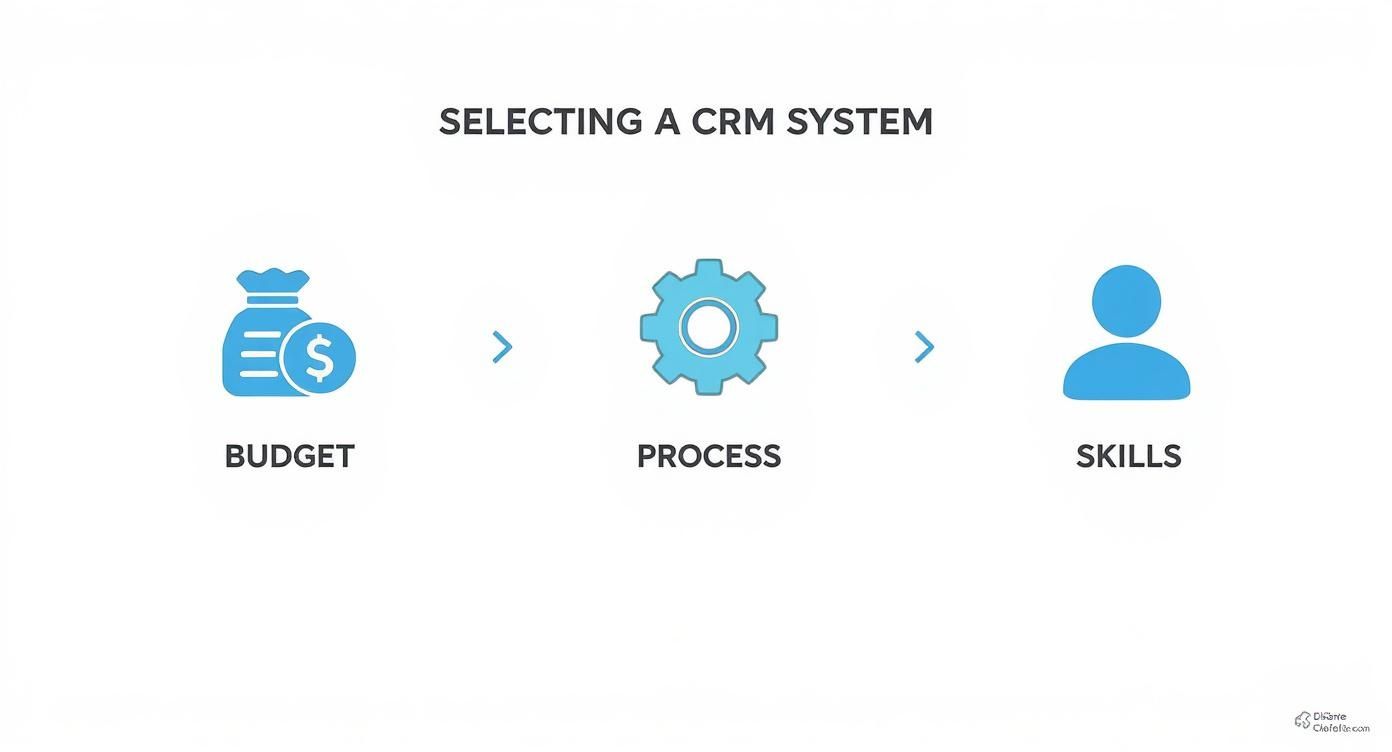
Essentially, how much you can spend, how complex your workflows are, and what technical skills you have in-house will point you toward the right customization path.
Phase 3: Prototyping and Feedback
Whatever you do, don't jump straight from a requirements document into a full build. Prototyping lets you play around with a basic version of the software—often just a wireframe or a simple mock-up.
This step is priceless for catching misunderstandings early. It gives your team a chance to weigh in on the layout and workflow before you’ve sunk a ton of money into development. A simple prototype can easily save you thousands in costly rework down the road.
Phase 4: Development and Integration
Alright, now the real building begins. Your development partner will take the approved prototype and start turning it into actual customized crm software. This work is usually done in short, focused bursts called "sprints."
This approach allows for regular check-ins, so you can make small adjustments along the way. This is also the stage where you'll connect the CRM to your other essential tools, like your email platform, marketing automation software, or accounting system.
Phase 5: Clean Data Migration
Your shiny new CRM is useless without good data. This is a make-or-break phase where you move all of your existing customer, deal, and contact info from your old systems (like spreadsheets or another CRM) into the new one.
A huge mistake people make is moving messy, duplicated data. You absolutely must take the time to clean, de-duplicate, and standardize your information before you migrate it. Starting with a clean slate is the only way your team will trust the new system from day one.
Phase 6: Thorough Testing and Quality Assurance
Before you unleash the system on your team, it needs to be put through its paces. The Quality Assurance (QA) team's job is to find bugs, test every feature, and try to break the software in every way they can think of.
You should also bring in a small group of your actual end-users for what’s called User Acceptance Testing (UAT). They'll run through their daily tasks in the new system to confirm it actually solves the problems you identified way back in Phase 1.
Phase 7: Strategic Training and Rollout
It's finally time to go live! A great launch is more than just flipping a switch; it's about preparing your team for the change. A solid training plan is absolutely non-negotiable.
Make the training specific to different roles. Show each person exactly how the new CRM will help them with their day-to-day work. Celebrate the launch, offer plenty of support as people get used to it, and keep gathering feedback for future tweaks. A thoughtful rollout is the key to getting everyone on board and making sure your new customized crm software becomes a tool they can't live without.
Future-Proofing Your Custom CRM Investment
A great custom CRM does more than just fix today's headaches. It should be a living asset that grows and changes right alongside your business. The real trick to getting a massive return on your investment is to build a system that can adapt to new tech and shifting team needs down the road. It's about thinking past what you need right now.
There are two things that are absolutely non-negotiable for any business that wants to stay competitive: artificial intelligence and killer mobile access. If you skip over these during the initial build, you're setting yourself up for expensive re-dos or a system that feels ancient in just a couple of years. The goal is a flexible foundation, one you can build on.
Integrating AI for a Competitive Edge
Let's be clear: artificial intelligence is completely changing the sales game. When you bake AI capabilities into your customized crm software from day one, you’re not just storing data—you're turning that data into a crystal ball.
Think about what AI-driven features can actually do for your sales process:
- Predictive Lead Scoring: Instead of guessing, an AI algorithm can look at your past wins and tell you which new leads are most likely to close. This helps your team focus their energy where it will have the biggest impact.
- Automated Data Enrichment: The system can go out and find missing contact info, automatically filling in the blanks. Your database stays clean and up-to-date without anyone lifting a finger.
- Sales Forecasting: AI can analyze your pipeline and past performance to give you revenue forecasts that are startlingly accurate.
And this isn't just theory. The AI in CRM market is projected to hit $11.04 billion by 2025 because this stuff actually works. AI can improve sales forecasting accuracy by over 40%, bump up repeat sales by 15%, and lead to response times that are up to 50% faster. If you want to dig deeper into these numbers, Kixie's 2025 report has some great CRM market insights.
Ensuring Seamless Mobile Access
Your sales team isn't chained to a desk anymore. They're on the road, meeting clients, and networking at events. A custom CRM that doesn’t work perfectly on a phone is a serious handicap.
A mobile-first CRM design isn't a nice-to-have; it's a flat-out necessity for any modern sales team. If your people can't pull up or update critical info from their phones, you're creating information bottlenecks and slowing down your entire sales cycle.
The mobile experience has to be seamless and intuitive. Your team needs to be able to update deal stages, log meeting notes, and pull up a client's entire history from anywhere, anytime. This on-the-go access is what keeps your CRM the single source of truth for everything customer-related.
When you're planning the build, make sure to press your developer on this. Ask them how the architecture will support a true mobile experience and ensure the interface is designed for smaller screens from the start. That kind of foresight protects your investment and gives your team the power to be productive, no matter where they are.
Your Top Questions About Custom CRM, Answered
When you start exploring custom CRM, a few big questions always come up: How much will this cost? How long will it take? And who actually owns the final product? These are the right questions to ask, and getting straight answers is key before you sign on the dotted line.
Let's break down what you can realistically expect.
How Much Does a Custom CRM Really Cost?
There’s no one-size-fits-all price tag here. The cost of a custom CRM depends entirely on how deep you need to go with the customization. Think of it like building a house—are you just remodeling the kitchen, or are you designing a new home from the ground up?
Here’s a rough breakdown of the investment levels:
- Simple Configuration: If you're just tweaking an existing platform like HubSpot or Salesforce, you might be looking at a few thousand dollars for a consultant's time.
- Low-Code/No-Code Solutions: Building a more tailored system on a low-code platform is a popular middle ground. These projects typically land in the $10,000 to $30,000 range.
- Fully Custom Builds: A completely unique CRM, built from scratch just for you, is a major investment. Expect these projects to start around $50,000 and often climb past $250,000 for enterprise-level systems with complex features.
How Long Will It Take to Go Live?
Just like cost, the timeline hinges on the complexity of your project. Simple configuration work might be done in a few weeks. It's a quick, focused effort to get you up and running.
Stepping up to a low-code or no-code build usually takes a bit longer, often between two to four months from the initial planning sessions to the final rollout.
Building a customized CRM software solution from the ground up is the most intensive path. You should plan for a timeline of six to twelve months, and sometimes even longer, depending on the scope.
A quick but crucial note on ownership: When you pay for a fully custom-built CRM, the contract must explicitly state that your company owns 100% of the intellectual property. That means the source code, the design, and all your data. This is non-negotiable—it’s how you protect your long-term investment.
Who Owns the Code and the Data?
This is a critical detail to get right from day one. If you use a low-code platform, you own the specific application you build and all the data inside it, but you're still licensing the underlying platform from the provider. You can't just pick it up and move it somewhere else.
For a truly custom build, however, the answer should be simple: you do. Your development agreement must grant your company full and complete ownership of the source code. Don't settle for anything less.