Let's be honest, running a small business often means juggling spreadsheets, scattered emails, and a mountain of sticky notes to keep track of customers. A CRM for small business is designed to end that chaos. Think of it as the central command center for all your customer information and conversations.
It's the one place your team can go to see the complete history of every client relationship and deal, all in real-time.
What a CRM for Small Business Actually Does

Picture your customer data as a busy orchestra. Right now, each instrument—your spreadsheets, email threads, and handwritten notes—is playing its own tune. It’s noisy and confusing. A CRM platform is the conductor, bringing every piece of information together to play in harmony.
For a small B2B team, this is huge. It turns random data points into real relationships and actual growth. No more guessing who last spoke to a client or what they talked about. The entire story is right there for everyone to see.
Moving Beyond Disorganized Data
Without a proper system, small businesses often cobble together a patchwork of tools that don't talk to each other. This creates information silos, where one person has a key piece of the puzzle that nobody else can see. The results are frustrating and expensive.
- Lost Leads: A great prospect follows up, but the email gets buried in an inbox, and the opportunity vanishes.
- Embarrassing Follow-ups: Two salespeople reach out to the same person with different messages, making your company look unprofessional.
- No Clear Pipeline View: The founder has no idea what deals are likely to close, making revenue forecasting a complete shot in the dark.
A CRM for small business fixes these exact problems. It provides a shared database where every call, email, and meeting is logged against the right contact and company.
A CRM isn’t just a digital address book. It’s the operational backbone for your entire revenue team, giving you the structure to manage complex B2B sales cycles where you need to build relationships with multiple decision-makers over time.
The Power of a Single Source of Truth
The main job of a CRM is to create a "single source of truth." This simply means everyone, from the sales manager to the newest rep, is looking at the same, up-to-date information. If a salesperson leaves, their knowledge and relationships don't walk out the door with them—it's all safe in the CRM.
This unified view helps your team operate with the clarity and efficiency of a much larger company. It’s the foundation for building consistent processes, tracking performance, and ultimately, closing more deals. It's no wonder the global CRM software market is booming, largely because small businesses are jumping on board to scale their B2B sales. The market recently hit US$298.61 billion, a 17.2% jump in just one year, with cloud-based CRMs leading the way. You can read more about these CRM software market insights and see how small and mid-sized businesses are catching up.
Core Features That Power B2B Sales Teams

Alright, so we know what a CRM is. But what separates a glorified digital address book from a tool that actually helps you close more B2B deals? The answer is in the features.
A great CRM for small business isn't just about storing data; it's a dynamic toolkit designed to make your sales team faster, smarter, and more consistent. Think of it like this: your CRM is the engine, and these core features are the high-performance parts that make it roar. Without them, you're just spinning your wheels.
Unified Contact and Account Management
First things first, a CRM has to organize your contacts. But in the B2B world, you're not just selling to individuals—you're selling to entire companies. This is where account-based management is non-negotiable.
Instead of a messy, scattered list of people, a B2B-focused CRM groups all contacts under their company account. This gives any rep an instant, 360-degree view of the entire organization. Who are the decision-makers? What conversations have we had? Are there any other open deals? It’s the difference between having a phone book and having a detailed org chart for every single prospect.
Here’s how it plays out: A sales manager sees her rep is talking to a marketing lead at a target account. With one click, she can see that another team member spoke with the CFO six months ago. Boom—instant context that could make or break the deal.
Visual Sales Pipeline Management
Your sales pipeline is the A-to-Z journey a prospect takes to become a customer. A visual pipeline turns that journey into an interactive, drag-and-drop board. Think Trello, but for making money.
This isn't just a "nice-to-have" feature; for small teams, it's a game-changer. Everyone can see exactly where every single deal stands, what needs to happen next, and—most importantly—where deals are getting stuck. It lets you spot a stalled deal before it goes cold and derails your entire forecast.
A visual pipeline is the command center for your entire sales operation. It’s a real-time snapshot of your company's financial health and keeps the whole team focused on what matters most.
Seamless Email Integration
Let’s be honest: your sales team lives and breathes in their email inbox. If your CRM forces them to constantly switch tabs to log calls or update a deal, they simply won't use it. End of story.
The best systems bring the CRM right into their existing workflow, whether it’s Gmail or Outlook. This means reps can sync conversations, create follow-up tasks, and update deal stages without ever leaving their inbox. All that critical information gets automatically tied to the right contact and account, eliminating hours of mind-numbing data entry and keeping your CRM data clean and reliable.
Smart Automation and Workflows
Automation is your secret weapon. It’s the tireless assistant that handles all the repetitive, low-impact tasks, freeing your team to do what humans do best: build relationships and solve problems for customers.
A good CRM for small business doesn't need to be overwhelmingly complex. It just needs a few powerful automations:
- Task Creation: Automatically remind a rep to follow up two days after they send a proposal.
- Email Templates: Let your team send personalized, pre-written emails in seconds, keeping messaging on-brand and professional.
- Lead Routing: Instantly assign a new lead to the right person based on territory or industry, so no opportunity goes cold.
These simple workflows add up fast, saving dozens of hours a month and making sure valuable leads never fall through the cracks. It's how a small, scrappy team can punch well above its weight.
To help you see the big picture, here’s a quick breakdown of the features every small B2B team should be looking for.
Essential CRM Features for Small B2B Businesses
This table cuts through the noise, showing you the core features and explaining exactly why they matter for your day-to-day sales grind.
| Feature | What It Does in Simple Terms | Why It's a Game-Changer for B2B Sales |
|---|---|---|
| Account Management | Groups all individual contacts under the company they work for. | Gives you a complete view of the entire organization, not just one person. Essential for navigating complex B2B buying committees. |
| Visual Pipeline | Shows your deals as cards on a board that you can drag between stages (e.g., "Lead," "Demo," "Closed"). | Provides an instant, at-a-glance health check of your sales funnel. Makes it easy to spot bottlenecks and forecast revenue. |
| Email Sync & Tracking | Connects to your inbox to automatically log emails and track opens and clicks. | Eliminates manual data entry, ensures all communication is recorded, and tells you which prospects are actually engaged. |
| Automation & Workflows | Sets up simple "if-then" rules to handle repetitive tasks automatically. | Saves your team hours of admin work, prevents leads from being forgotten, and ensures consistent follow-up. |
| Reporting & Analytics | Turns your sales data into easy-to-read charts and reports. | Helps you understand what’s working (and what's not) so you can make smarter decisions instead of guessing. |
| Integrations | Connects your CRM to other tools you use, like your calendar, email marketing, or accounting software. | Creates a single source of truth for all customer information, stopping data from getting siloed in different apps. |
| Security & Permissions | Lets you control who can see and edit what information. | Protects sensitive customer data and ensures reps only see the accounts and information relevant to them. |
Having these foundational features in place is what turns a CRM from a passive database into an active partner in growing your business. They work together to give your team the structure, insight, and efficiency needed to win.
Turning CRM Data into Smarter Decisions
A CRM is so much more than a digital Rolodex. Sure, it stores customer information, but that's just the starting point. The real magic happens when you use that data to make faster, smarter decisions. This is where analytics and integrations come in—they’re what turn your CRM from a passive database into the engine that drives your growth.
Think of CRM analytics as your business's real-time dashboard. Instead of trying to run your sales team on gut feelings or messy, outdated spreadsheets, a good CRM gives you clear, visual reports. You can see what’s working, what’s not, and where you need to focus, all in a single glance.
For a sales manager, this is a game-changer. You can see the entire pipeline in one place, know which reps are on track to hit quota, and spot deals that are starting to stall. That kind of visibility is what lets you build an accurate forecast and coach your team effectively before problems arise.
Uncovering Insights with Key Metrics
Great analytics isn't about drowning in data; it's about focusing on the numbers that actually move the needle for a B2B business. A well-designed dashboard cuts through the noise and highlights the key performance indicators that tell the story of your sales process.
Here are a few of the must-track metrics your CRM should deliver:
- Sales Cycle Length: How long does it take, on average, to close a deal from first touch to signed contract? If that number starts creeping up, you know you’ve got a bottleneck somewhere in your process.
- Conversion Rate by Stage: What percentage of deals are making it from one stage of your pipeline to the next? If you see a big drop-off after sending proposals, it might be a sign that your pricing is off or your value prop isn't landing.
- Lead Source Performance: Where are your best deals coming from? This metric shows you which channels—organic search, paid ads, referrals—are actually delivering customers, not just clicks. It tells you exactly where to put your marketing dollars.
By keeping an eye on these data points, founders and RevOps leaders can stop reacting to problems and start planning strategically, making moves based on solid evidence instead of guesswork.
Your CRM data is a goldmine. Analytics gives you the map and the shovel to find the hidden opportunities that will shorten sales cycles, improve efficiency, and ultimately, grow revenue.
Creating a Connected Business Ecosystem
If analytics gives you insight, integrations give you power. Integrations are the bridges that connect your CRM to all the other tools you use to run your business, creating a single, automated workflow. This puts an end to mind-numbing manual data entry and breaks down the information silos that kill productivity.
Picture this: your salesperson marks a deal "Closed-Won" in the CRM. Instantly, your accounting software generates an invoice, and your marketing platform sends out a welcome email. That’s the kind of seamless efficiency integrations make possible.
When your tools are connected, your CRM becomes the single source of truth for every customer interaction. This is especially vital for small businesses where everyone tends to wear multiple hats. To see how different data can be organized, you can check out these powerful CRM database examples.
The financial impact is crystal clear. On average, businesses see an $8.71 ROI for every $1 spent on CRM. That return is driven by the huge efficiency gains you get from making data-driven decisions. For B2B sales teams specifically, using CRM analytics to fine-tune their process often leads to 15-25% lifts in growth. You can find more stats on how CRM investment pays off and delivers real results for small companies.
How to Successfully Launch a CRM Your Team Will Love
Even the most powerful CRM for small business is completely useless if your team avoids it like the plague. The real challenge isn’t just picking the right software; it's getting your people to actually use it every single day. A successful launch isn't about a big, flashy event—it's a thoughtful process focused entirely on winning over your team from day one.
The goal is to make the CRM an indispensable part of their workflow, not just another mandatory login. This means you have to stop talking about features and start talking about solutions. Instead of a generic tour of every button and menu, your rollout should be a masterclass in solving your team's most annoying problems.
Start with Clean Data
Before you even think about importing a single contact, you have to deal with your existing data. Trying to launch a CRM with a messy, disorganized spreadsheet is like trying to build a house on a shaky foundation. It’s a recipe for disaster. This "garbage in, garbage out" problem is the number one reason new CRM projects fail.
Take the time to clean up your data before you import it. This is a non-negotiable first step.
- Remove Duplicates: Get rid of duplicate contacts and companies. Nothing says "we're disorganized" like three different reps calling the same person.
- Standardize Formatting: Make sure all data, like phone numbers and addresses, follows the same, consistent format.
- Fill in the Gaps: Ensure every key contact has an owner, an email address, and a company linked to them.
This upfront work prevents a massive headache later on and helps your team immediately trust the information they see in the new system. A clean database just makes everyone's job easier and builds instant confidence.
Focus on Solving a Single Big Problem First
The "start small, win big" approach is your best friend here. Don't try to boil the ocean by introducing every single feature all at once. Instead, identify one or two of the biggest headaches your team deals with and show them exactly how the CRM makes that pain go away.
The key to getting your team on board is to make the CRM the hero of their story. Show them how it saves them time, kills tedious work, or helps them close deals faster, and they will absolutely embrace it.
For example, is your biggest problem tracking follow-ups? Make the first training session entirely about creating and managing tasks. Are leads constantly falling through the cracks? Focus exclusively on how the visual pipeline gives everyone total clarity. Once your team sees the CRM deliver a real, tangible win, they'll be far more open to learning what else it can do.
Train for Real-World Scenarios
Nobody wants to sit through a boring, feature-by-feature presentation. Good training is engaging, problem-focused, and built around your team's actual day-to-day work. Ditch the generic slides and build your sessions around the real situations they handle every day.
- Role-Play a Lead: Walk through the entire process—from adding a new lead and sending a follow-up email to moving them through the pipeline.
- Use Real Data: Use your newly cleaned data during training so the team is working with familiar accounts and contacts, not dummy info.
- Keep it Short and Sweet: Break training into multiple, shorter sessions. A few focused 45-minute meetings are far better than one overwhelming three-hour marathon.
This flowchart shows the simple but powerful process of turning your CRM data into better business decisions.
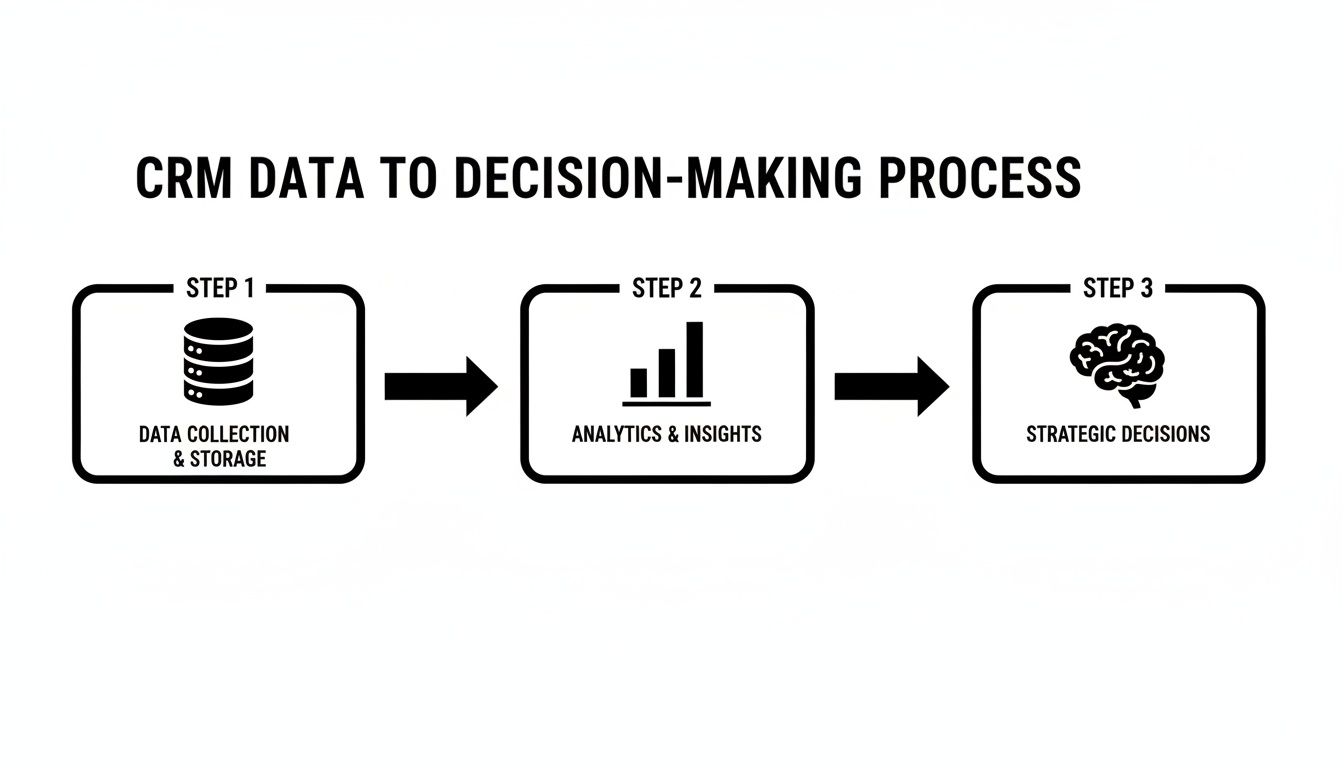
The flow is clear: clean data, processed through analytics, leads directly to smarter, more strategic decisions.
Leadership Must Lead the Way
A successful CRM launch needs visible and vocal support from the top. If the founder or sales manager isn't using the CRM, why would anyone else? Leaders have to champion the new system and treat it as the single source of truth for everything sales-related.
This means running meetings directly from the CRM dashboard, asking for updates based on pipeline data, and constantly referencing information within the system. When the team sees that leadership is all in, they'll follow suit.
For more on the entire rollout process, check out our complete guide on how to implement a CRM system from start to finish. This playbook will help you make sure your investment pays off by making the CRM an essential tool for your entire team.
Common CRM Mistakes and How to Sidestep Them
Rolling out a new CRM is a big moment for a small business, but it's a path with a few common tripwires. Honestly, knowing what to watch out for is just as important as picking the right features. Most CRM projects that go south don't fail because the software was bad; they fail because of a few avoidable mistakes during the setup and launch.
If you can see these traps coming, you can steer right around them. This isn’t about being negative—it's about being smart so your investment actually pays off. Let's walk through the mistakes I see companies make all the time and, more importantly, how you can dodge them.
Choosing an Overly Complex System
It's so easy to get wowed by a CRM that promises to do everything. The problem? Small B2B teams rarely need all that firepower. A classic mistake is buying a system built for a Fortune 500 company, which means you're paying a premium for features you'll never touch.
That complexity doesn't just hit your wallet. It creates a massive learning curve that can overwhelm your team and kill adoption before it even starts. The tool that was supposed to help becomes a source of daily frustration.
The Solution: Stick to what you actually need. Before you even look at demos, make a short, non-negotiable list of "must-have" features that solve your biggest headaches today. Look for a CRM for small business that feels intuitive and is clearly built for B2B sales, not one that tries to be a Swiss Army knife for the entire world.
Neglecting Data Quality
Your CRM is only as good as the information you put into it. It’s the classic "garbage in, garbage out" scenario. If you dump a messy, duplicate-riddled spreadsheet into your shiny new system, your team will lose faith in it on day one. Your reports will be useless, and your forecasts will be a fantasy.
A clean, accurate database is the foundation of everything. Taking the time to get your data right isn't just a "nice-to-have"—it's the single most important step for getting this right long-term.
To sidestep this landmine, set aside real time for data cleanup before you import a single contact.
- De-duplicate Contacts: Hunt down and merge all the duplicate records for people and their companies.
- Standardize Fields: Make sure job titles, states, and other key fields are formatted the same way across the board.
- Fill in the Gaps: Every important contact needs an owner and the essential info to actually reach them.
This upfront work feels tedious, but it pays off instantly. Your team will trust the tool from the get-go.
Failing to Secure Team Buy-In
You can’t just drop a new piece of software on your team and expect them to love it. When a CRM is mandated from the top down, it's often met with eye-rolls and resistance. If your reps don't get why this helps them, they'll just see it as more admin work standing between them and their commission checks.
The Solution: Bring your team into the conversation from the very beginning. Ask them what their biggest time-sinks and frustrations are. Then, show them exactly how the right CRM solves those specific problems. By improving customer relationship management, you're giving them a tool to make their lives easier, not harder.
When they see it as something that helps them close deals faster and eliminates grunt work, they’ll actually want to use it. This turns them from skeptics into your biggest advocates, making sure the CRM becomes a core part of how you grow.
How to Choose the Right CRM for Your Business
Alright, let's turn all this talk into action. You know what a B2B CRM is supposed to do, so now it’s time to actually pick one. The goal here isn’t to find some mythical, "perfect" system, but to find the one that’s the right fit for your team, your sales process, and where you want to go.
First things first: take a breath and figure out what you actually need. Forget the fancy feature lists for a second and think about your team’s biggest headaches right now. Are leads falling through the cracks? Is follow-up a complete mess? Do you have zero clue what your sales pipeline even looks like?
Pinpoint the top one or two problems you absolutely have to solve. That clarity will be your compass, keeping you focused during demos and stopping you from getting sidetracked by shiny objects you’ll never use.
Evaluating Your Options
With your core needs locked in, you can start looking at a few CRMs. This is where free trials and product demos become your best friends. Don't just sit back and watch a polished sales pitch—show up with a list of things you need to see the software do.
A free trial is your opportunity to kick the tires in a real-world (but safe) environment. During the trial period, make sure you:
- Import a small chunk of your data. Is the import process straightforward or a nightmare?
- Build a test pipeline. Get your team to drag a few dummy deals from one stage to the next. How does it feel to use?
- Test one critical integration. Connect your email or calendar and see if it actually works as advertised.
Think of a CRM trial like a test drive. You need to get behind the wheel to feel how it handles and see if it truly fits your team’s driving style before you commit to buying the car.
Asking the Right Questions
When you’re on a demo or a call with a sales rep, you have to ask the hard questions to see past the slick presentation. Remember, you’re not just buying software; you’re starting a long-term partnership.
Make sure you ask every potential vendor about:
- Scalability: "How does your pricing change as we add more users or need more advanced features? What are the hidden costs I’m not seeing?"
- Customer Support: "What kind of support is included with our plan? What’s a realistic response time if we have a problem?"
- Onboarding and Training: "What do you provide to get my team up and running fast? Are we on our own, or do you help?"
Making the right choice really just comes down to doing your homework. By nailing down your needs, testing the platform yourself, and asking tough questions, you’ll find a CRM for small business that genuinely helps you grow—not just another subscription to manage.
Common Questions We Hear About Small Business CRMs
Jumping into the world of CRM software usually sparks a few questions. Let's tackle the big ones head-on so you can move forward feeling confident, not confused. The goal is to find a tool that actually helps you grow, not one that just adds to your to-do list.
Here are the answers to the questions we get asked most by founders and sales leaders.
How Much Should a Small Business Expect to Pay for a CRM?
The pricing can feel all over the map, but most modern CRMs charge on a per-user, per-month basis. For a solid CRM for small business, you can typically find starter plans in the $15 to $30 per user per month range. If you need more powerful features like advanced automation or in-depth analytics, you're likely looking at $50 to $100+ per user.
But don't just compare the monthly fees. The real value is in the total package—how easy is it to use? How good is their support when you get stuck? Does it connect with the other tools you already rely on? Always take it for a spin with a free trial before you put a credit card down.
When Is the Right Time to Finally Get a CRM?
The simple answer? Just before you hit the breaking point. If you're starting to lose track of leads, your team isn't on the same page about where a deal stands, or you have zero visibility into your sales pipeline, that's your sign. If you’re living in spreadsheets and they're becoming a tangled, untrustworthy mess, it’s time.
My best advice is to get ahead of the chaos. Putting a CRM in place while your team is small builds great habits from day one and creates a solid foundation you can scale on.
Can I Get My Existing Customer Data Out of Spreadsheets and Into a CRM?
You bet. Pretty much every CRM worth its salt is built to import data from CSV files, which you can easily export from Excel or Google Sheets.
The secret to a painless switch is cleaning up your data before you import it. That means getting rid of duplicate contacts, making sure all phone numbers are in the same format, and filling in any missing info. A little bit of prep work here prevents a ton of frustration later and makes sure your team trusts the data from the get-go.