Think of a great agency CRM as the central nervous system for your entire operation. It's the one place that connects all the dots—client data, project timelines, and financials. It's so much more than a glorified address book; it’s an active partner in managing the entire client journey, from the first proposal to the final invoice. When it works, nothing falls through the cracks.
Why Your Agency Needs More Than a Generic CRM

Let’s be real for a second. Most CRMs are designed for traditional sales teams, not for the fluid, project-based world of a creative agency. Trying to run your agency on one of those is like trying to hammer a nail with a screwdriver. You might get the job done, but it’s clumsy, inefficient, and you'll probably make a mess.
Standard sales CRMs follow a simple, linear path: lead comes in, becomes an opportunity, turns into a sale, and the deal is closed. This is perfect if you’re selling widgets. But for agencies, "closing a deal" is just the beginning of a complex, long-term relationship filled with countless projects, deliverables, and team members.
The Friction of a Mismatched Tool
When you try to shoehorn a generic CRM into your agency's workflow, you create constant friction. The system feels like it’s fighting you because its very structure doesn't get how you work. This misalignment isn’t just annoying; it creates real problems that can sink your profitability and crush team morale.
You’ll start noticing issues like:
- Disconnected Project and Client Data: Project updates live in one tool, while client emails are buried in someone’s inbox. Your team ends up toggling between a dozen tabs just to get a complete picture, wasting time and energy.
- Chaotic Communication Trails: Important feedback, call notes, and approvals get lost in scattered email threads and random Slack channels. Without a single source of truth, miscommunications are bound to happen, leading to frustrating revisions and unhappy clients.
- Inaccurate Profitability Tracking: How do you know if a client is actually profitable? Without tying project time and costs directly to the client record, it’s all just guesswork. You can’t tell which services are making you money and which are secretly draining your resources.
The core problem is this: a sales-focused CRM sees a client as a transaction to be won. An agency-specific CRM understands a client is a relationship to be nurtured and grown through successful work.
Moving Beyond Basic Contact Management
A generic CRM can tell you a client’s name and phone number. But can it show you the real-time status of their three active projects, their payment history, or the notes from last week’s creative review? Nope. It’s missing the context you need to be a true strategic partner.
This forces agencies to create a chaotic patchwork of spreadsheets, project management tools, and shared documents to fill in the gaps. This "system" is fragile, messy, and simply won't scale with you. A specialized CRM for agencies isn't a nice-to-have; it's the foundation for operational clarity and sustainable growth. It’s built from the ground up to embrace the beautiful chaos of agency life.
The Core DNA of a True Agency CRM
Let's get one thing straight: a true CRM for agencies isn't just a generic sales tool with a few extra fields. It’s built differently from the ground up because it has to manage relationships that revolve around projects, not just one-off transactions. Think of it like this: a standard CRM is an address book for names and numbers, but an agency CRM is an interactive blueprint for an entire construction project. One stores data; the other maps out the entire process.
This difference is everything. Agency life is a constant juggle of client service, creative production, and financial oversight. Your CRM has to be the central hub that connects all those moving parts. Without the right foundational features, you're just using a glorified spreadsheet that ends up creating more chaos than it solves.
It's no surprise the demand for these systems is exploding. The global CRM software market is already valued at around $101.4 billion and is projected to hit an incredible $262.74 billion by 2032. Why the massive growth? Because data-driven client management works. Agencies using the right tools have seen their sales efficiency jump by as much as 29%. You can dig deeper into these powerful CRM statistics and see the real-world impact they have.
Unified Client and Project Management
First and foremost, you need a system that connects client information directly to project data. This is non-negotiable. A proper agency CRM doesn’t just hold a client's contact info; it links that client record to every single project, task, invoice, and conversation you've ever had with them. It creates a single source of truth for your entire team.
Imagine an account manager pulling up a client and instantly seeing:
- Active Projects: A real-time dashboard of all ongoing campaigns, showing their status, deadlines, and key milestones.
- Communication History: A complete log of every email and meeting note, so no one has to dig through their inbox to find out what was said.
- Financial Health: A quick snapshot of past invoices, current retainers, and the overall profitability of the account.
This unified view stops critical information from getting trapped in different departments or software. It puts everyone—from creative to finance—on the same page, which is the absolute bedrock of great client service.
Context-Rich Contact Management
Agency relationships are never just one-to-one. You're dealing with a whole cast of characters on the client side: the marketing director, the brand manager, the person in finance who signs the checks. Each has a different role and level of influence. A standard CRM's contact fields are just too rigid to capture this kind of complexity.
An agency-specific CRM, on the other hand, lets you build richer, more detailed contact profiles. You can map out organizational charts, define each person's role on a specific project, and track individual communication threads. That context is pure gold when it comes to building strong relationships and navigating the client's internal politics.
An agency CRM should answer not just "Who is this person?" but also "What is their role in this project, and what was the last thing we discussed with them?"
This level of detail means you can tailor your communication perfectly. You know exactly who needs to approve a design, who signs off on the budget, and who to call for technical feedback—all from one organized screen.
Integrated Task and Deadline Tracking
Scope creep and missed deadlines are the twin nightmares that keep agency owners up at night. A CRM built for agencies tackles this head-on by integrating task management right into the platform. This isn't about ditching your favorite tools like Asana or Trello, but about linking tasks directly to the client and project they belong to.
This integration creates a clear line of sight from a client request all the way to the specific tasks needed to get it done. Project managers can assign work, set deadlines, and watch progress unfold without ever leaving the CRM. When every task is tied to a client record, it becomes simple to track billable hours, justify costs, and maintain a clear audit trail of all the work performed. That’s how you protect your agency from those dreaded arguments over scope and deliverables.
How to Choose the Right CRM for Your Agency
Picking a new CRM for your agency can feel overwhelming. You're bombarded with countless options, all promising the world, and it's easy to get lost in feature lists and slick sales pitches. Here’s the secret: the goal isn’t to find the platform with the most features, but the one that fits the unique way your agency works.
Think of it like buying a vehicle. A two-seater sports car is exciting, but it’s completely useless if you need to haul gear for a video shoot. In the same way, a massive enterprise-level CRM might be incredibly powerful, but it could be total overkill and painfully complex for a nimble creative team. You have to find the right fit for your specific journey.
To do that, you need a clear framework. By focusing on a few critical criteria, you can cut through all the noise and make a confident choice that truly helps your team, rather than giving them another headache.
Start With Your Core Needs and Pain Points
Before you even think about watching a single demo, you need to look inward. What are the actual, specific problems you're trying to solve? Vague goals like "we need to be more organized" won't get you anywhere. You have to pinpoint the exact friction in your current process.
Get your team involved and ask some pointed questions:
- Where does client communication constantly get lost or jumbled?
- How many hours are we wasting every week just manually updating spreadsheets or jumping between systems?
- What’s the biggest bottleneck we face from the moment we win a new client to kicking off their project?
- Can we see, right now, how profitable our projects actually are?
Answering these questions first creates your agency’s personalized scorecard. As you look at different CRMs, you can measure them against your real, documented pain points, not just some generic feature checklist.
Generic Sales CRM vs Agency-Specific CRM: A Feature Comparison
It's crucial to understand that not all CRMs are created equal, especially when it comes to the unique demands of an agency. A standard sales CRM is built around a linear sales funnel, while an agency CRM needs to manage complex, non-linear client relationships and project delivery.
Here’s a quick breakdown of the key differences:
| Feature | Generic Sales CRM | Agency-Specific CRM |
|---|---|---|
| Primary Focus | Lead generation, sales pipeline, and closing deals. | Client relationship management, project delivery, and profitability tracking. |
| Contact Management | Tracks leads, prospects, and customers in a sales context. | Manages a web of contacts: clients, vendors, partners, and internal team members. |
| Project Management | Limited or non-existent. Often requires a separate tool. | Integrated project management with tasks, timelines, resource allocation, and budgets. |
| Financials | Focuses on deal value and sales forecasting. | Tracks project budgets, retainers, time, expenses, and overall client profitability. |
| Client Communication | Logs sales calls and emails. | Centralizes all client communication, files, and approvals related to projects. |
| Workflow | Linear: Lead > Opportunity > Won/Lost. | Cyclical & complex: Sales > Onboarding > Project Delivery > Reporting > Upsell. |
As you can see, a generic CRM will leave you trying to fit a square peg in a round hole. An agency-specific platform is built from the ground up to support the way you actually work, which is a game-changer for efficiency and clarity.
Evaluate Scalability and User Adoption
A CRM is a long-term commitment, so it has to be able to grow with you. The system that works beautifully for a team of five might start to creak and groan when you hit twenty. Think about its ability to handle more clients, bigger projects, and more complex workflows down the line without forcing you to start from scratch.
Just as important—maybe even more so—is user adoption. The most powerful software on the planet is worthless if your team hates using it. A clunky interface is a recipe for disaster, as people will inevitably revert to their old spreadsheets.
The best CRM for your agency isn't the one with the most bells and whistles; it's the one your team will actually use every single day.
Look for a simple, clean interface that feels intuitive. If it mirrors the way your agency already thinks about its work, you'll have a much easier time getting everyone on board.
Prioritize Seamless Integrations
Your agency already relies on a whole stack of tools you can't live without—Slack for team chat, Google Drive for files, and QuickBooks for the books. A great CRM for agencies doesn’t try to replace these; it acts as the central hub that connects them all.
Check for a robust integration marketplace or a well-documented API. The whole point is to create a single source of truth where data flows automatically between your systems. This puts an end to mind-numbing double data entry, cuts down on human error, and gives everyone the full picture in one place. This is also a defining feature of a good CRM for professional services firms, where connecting disparate business functions is key to success.
Create a Pilot Group to Test Drive Your Top Choices
Watching demos and reading reviews will only get you so far. The absolute best way to choose a CRM is to put it to the test with real work. Once you’ve narrowed your list to two or three top contenders, pull together a small pilot group with people from different roles—say, an account manager, a project lead, and someone from your creative team.
Have this group run a small, real-world project from start to finish entirely within each test CRM. This trial by fire will reveal things a sales demo never will:
- Workflow Friction: Where does the software feel clunky or slow things down?
- True Usability: Is it actually easy to find what you need and update progress on the fly?
- Real-World Value: Does it genuinely solve the pain points you identified from the very beginning?
This hands-on approach takes your decision from theoretical to practical. It’s the ultimate litmus test to ensure the platform you choose works for your agency in reality, not just on paper.
Advanced Features That Fuel Agency Growth
Once you’ve got the basics down—your contacts, projects, and tasks are all in one place—it’s time to look at what really separates the good agencies from the great ones. These advanced capabilities are the engine for serious, sustainable growth. They shift you from just managing the work to actively optimizing your entire operation for more profit and less chaos.
Think of it like this: the core features are the frame and wheels of a car. They get you on the road. The advanced features? That’s the turbocharger and the GPS—they get you there faster, smarter, and way ahead of the competition. Putting these tools to work is how an agency scales up without the wheels falling off.
And this isn't just a hunch; the numbers back it up. We've seen firsthand how agencies that adopt the right CRM tech get a huge leg up. Research shows that companies with a powerful CRM see, on average, a 29% increase in revenue and a 34% jump in team productivity. That’s a clear line from the right tool to real growth. You can dig into more of these compelling CRM benefits and findings on EmailVendorSelection if you want to see the full picture.
Automated Client Onboarding Workflows
The client relationship officially kicks off the second that contract is signed. A clunky, disorganized onboarding is the fastest way to make a new client question their decision. With automated workflows, you can guarantee every single new client gets a flawless, professional welcome.
Imagine this: instead of your team scrambling to create folders, send welcome emails, and schedule kickoff meetings, a workflow does it all the moment a deal is won.
- The Trigger: A deal is moved to the "Won" stage.
- Action 1: A new client project is instantly created from a pre-built template.
- Action 2: A welcome email, complete with a link to their client portal, goes out automatically.
- Action 3: The account manager and project lead get their initial setup tasks assigned right away.
This kind of automation doesn't just save a ton of admin time—it ensures those critical first steps never get missed. It sets a brilliant, organized tone for the entire partnership.
Integrated Time Tracking and Billing
How do you know if a client is actually profitable? It's a question that keeps a lot of agency owners up at night. Without connecting your team's time directly to the money that client brings in, you're just guessing. A CRM with built-in time tracking and billing finally gives you that clarity.
This integration lets you see, in real-time, how many hours have been burned against a project's budget. It’s an early warning system for scope creep, helping your project managers make smart calls on where to put resources. And when it's time to send an invoice, the system pulls every billable hour automatically. No more revenue leakage from unbilled work. This is a core part of building a healthy agency, which we cover in our ultimate guide to B2B pipeline management.
The single biggest financial lever an agency can pull is understanding project profitability. Integrated time and billing features make this possible, turning your CRM into a powerful financial management tool.
Sophisticated Reporting and Analytics
Your agency is sitting on a goldmine of data. Advanced reporting is the key to unlocking it, showing you exactly what’s working and what isn’t. Instead of just glancing at top-line revenue, you can dive deep to truly understand the health of your business.
A great agency CRM lets you build custom dashboards that answer the questions that really matter:
- Which of our services brings in the highest profit margin?
- Who are our top 10 most profitable clients of all time?
- What’s our average team utilization rate? Who's over capacity and who has room?
- What kinds of projects consistently blow their budgets?
These insights are priceless. They give you the confidence to make strategic moves, like focusing sales on your most valuable services or tweaking your pricing model. It’s all about working smarter, not just harder.
Your CRM Implementation and Migration Plan
Picking the right CRM for your agency is a big win, but the real work starts when you roll it out to your team. A powerful platform is just an expensive paperweight if it sits there unused. A smart, well-thought-out implementation plan is what turns that software investment into a genuine engine for growth.
Think of it like building a piece of IKEA furniture. If you jump in and start screwing pieces together without looking at the instructions, you're going to end up with a wobbly table and a pile of mystery parts. A structured approach ensures everything fits together right the first time, giving you a solid foundation to build on.
I've seen it time and again: a phased rollout almost always beats a "big bang" launch. Trying to switch everyone over at once is a recipe for chaos. A gradual approach minimizes the disruption, lets you iron out the kinks with a small group first, and builds positive momentum as more of the team comes on board.
This flow chart shows the core agency operations—from bringing a client on to billing them and reporting on results—that your CRM should streamline once it's up and running.
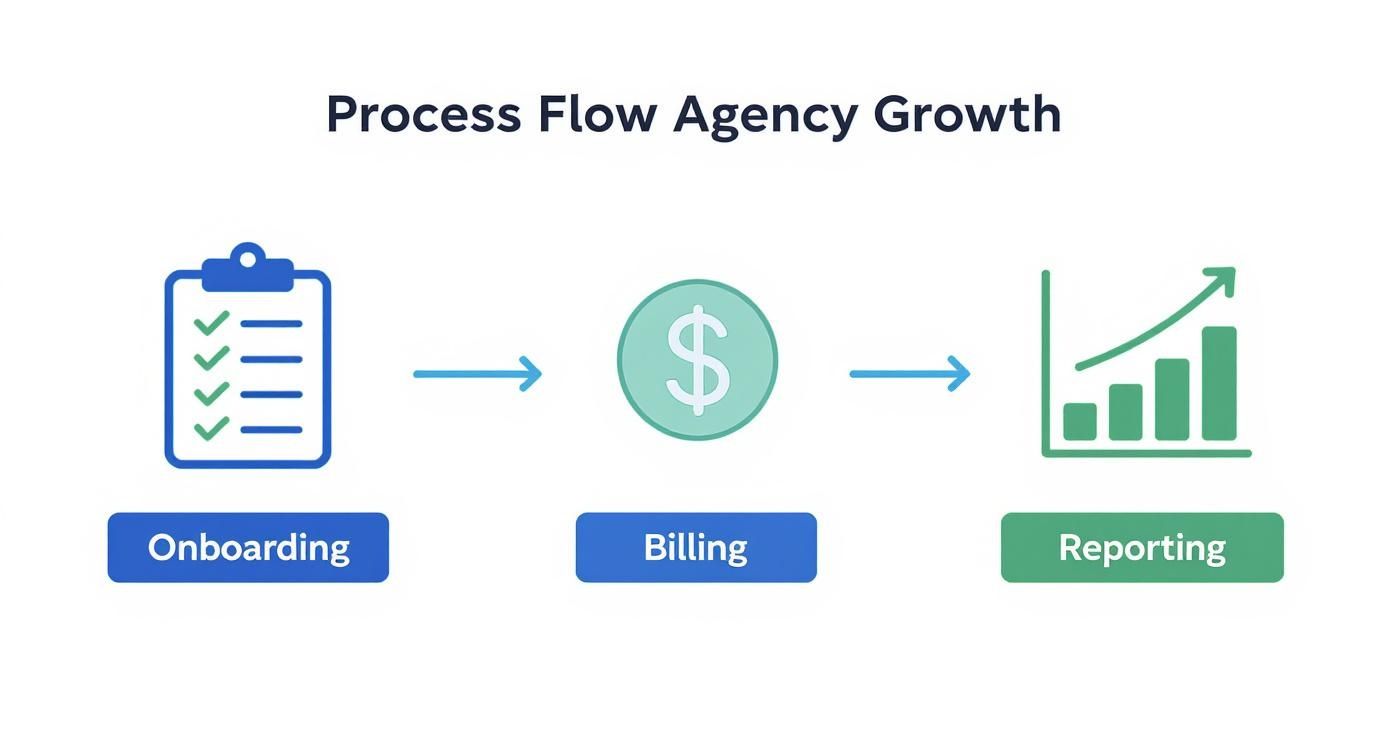
The whole point is to connect these separate stages into a single, unified view of the entire client journey. That's the real prize of a successful implementation.
Phase 1: Pre-Launch Preparation
Before a single person logs into the new system, you've got some prep work to do. This is the most important phase—get this right, and everything that follows becomes ten times easier. Rushing it will only lead to a messy, frustrating launch day.
First up: clean your data. Moving messy, outdated, or duplicate contacts into a new CRM is like moving all your junk into a beautiful new house. It just makes the new place messy. Take the time to scrub your spreadsheets and contact lists clean. A fresh import means a fresh start.
Next, you need to define roles and set permissions. Not everyone on your team needs to see and do everything.
- Account Managers will probably need full visibility into client emails and project financials.
- Creative Team Members might just need to see their assigned tasks and deadlines.
- Leadership will want access to the high-level reports on profitability and the sales pipeline.
Setting these permissions from day one prevents confusion and keeps sensitive client or financial data secure.
Phase 2: The Launch and Training
With clean data and clear roles, it's go-time. The key here is to provide practical, role-specific training. Don't just give your team a tour of every single feature. Instead, show them exactly how the CRM will make their job easier.
A successful CRM launch isn't about teaching features; it's about solving problems. Frame the training around answering questions like, "How can I find client feedback faster?" or "Where can I see all my deadlines in one place?"
You also need to establish clear ground rules for using the system. For example, you might decide that all client-facing emails must be logged in the CRM, or that all project tasks have to be updated by the end of each day. Consistency is what turns the CRM into that "single source of truth" everyone talks about.
Phase 3: Post-Launch Support and Optimization
Your work isn't over when the CRM goes live. The first few weeks are critical for building good habits and listening to feedback. Schedule regular check-ins with the team to see what's working and what's causing headaches. For more ideas on keeping your client management system running smoothly, check out the great articles over on the B2B CRM blog.
Find someone on your team to be an internal "CRM champion." This should be a tech-savvy person who is genuinely excited about the new system. They can be the go-to resource for quick questions, which frees up managers and stops small frustrations from turning into big problems.
Finally, remember that your CRM is not a set-it-and-forget-it tool. Your agency will change, and your processes will need to change with it. Plan to review your workflows every quarter. Look for new ways to automate tasks or improve your reporting. This ongoing tune-up is what ensures your CRM keeps delivering value long after the launch party is over.
How to Measure Your CRM Success
So, you’ve put in the time and money to get a new CRM up and running. Great. But how do you know if it's actually working? The real win isn't just about feeling more organized; it's about seeing a tangible impact on your agency's health.
To do that, you need to look past the surface-level stuff and dig into the numbers that really matter. These are the Key Performance Indicators (KPIs) that connect your CRM usage directly to your agency's bottom line. Think of them as the vital signs of your business—they give you a clear, data-driven picture of your return on investment.
Core Agency KPIs to Track
To get a real sense of your CRM's impact, you need to focus on the metrics that tie your day-to-day work to long-term financial health. Here are the big four.
-
Client Lifetime Value (CLV): This is the total amount of revenue a client brings in over the entire course of your relationship. A rising CLV is a fantastic sign—it means you're not just landing one-off projects, but building partnerships that last. Your CRM should be able to pull all the invoices and project values for a client to give you this number at a glance.
-
Project Profitability: This is the ultimate gut check. How much money are you actually making on each project once you subtract all the time and expenses? A good CRM with time tracking can calculate this for you, showing you which clients and services are your cash cows and which ones are just eating up resources.
-
Client Retention Rate: Simply put, what percentage of your clients stick around? High retention is a direct reflection of happy clients and a smooth operation. Your CRM helps by keeping track of contract end-dates and can even flag accounts that might be at risk of leaving, giving you a chance to step in.
A great CRM doesn’t just store client data; it turns that data into actionable financial insights. It should clearly answer the question: "Are our client relationships getting more valuable over time?"
Analyzing the Data for Better Decisions
Just tracking these numbers isn't enough. The real magic happens when you start analyzing the trends your CRM uncovers.
For example, maybe you notice that clients who went through your new automated onboarding workflow have a 15% higher CLV. That’s concrete proof that your new process is working. Or perhaps the data shows that projects with a detailed scope of work logged in the CRM are 20% more profitable. Boom—now you have a compelling reason to make that a mandatory step for every project.
This is how a CRM goes from being a glorified rolodex to a strategic command center. It gives you the hard numbers you need to make smarter decisions that will actually grow your agency.
Common Questions About Agency CRMs
Let's be honest, diving into the world of agency CRMs can feel a little overwhelming. You've got questions, and getting straight answers is the only way to feel confident you’re making the right call for your business.
We’ve heard these same questions from countless agency owners. Here’s a no-fluff breakdown of what you really need to know.
How Much Should an Agency Budget for a CRM?
The price range for CRMs is all over the map, from $15 to over $150 per user, per month. For a small agency of about 5-10 people, a realistic budget falls somewhere between $200 and $700 a month for a solid platform.
But fixating on the monthly subscription cost is a classic mistake. The real conversation should be about the return on your investment. Think about it: if a good CRM for agencies saves every person on your team a few hours of admin work each week, it’s already paying for itself. If it helps you catch one major project issue before it snowballs, the ROI is massive.
Always focus on the value it brings—the problems it solves and the time it saves—rather than just hunting for the lowest price tag.
Can We Just Use a Project Management Tool Instead?
We get this one a lot. Tools like Trello or Asana are brilliant for managing tasks and timelines, no doubt. But they’re missing the "R" in CRM—the Relationship. They track the what, but they don't give you the who or the why.
A true agency CRM weaves your project data together with the entire client story. It connects the dots from the very first sales call and initial proposal to every email, meeting note, and invoice that follows. Sticking with just a project management tool leaves you with a siloed, incomplete picture of your client relationships.
An agency-focused CRM gives you the best of both worlds. It links your projects directly to the people and the revenue they generate, creating a single source of truth that a standalone PM tool just can't match.
What Is the Biggest Mistake When Implementing a CRM?
The single biggest reason CRM rollouts fail is simple: poor team adoption. Agencies will spend a ton of money on a powerful platform and then completely drop the ball on training. If your team doesn’t know how to use it—or why they should—it just becomes expensive, unused software.
The surefire way to avoid this is to get your team involved from day one. Let them have a say in the selection process. When it's time to roll it out, provide hands-on training that’s specific to their roles, showing them exactly how this new tool makes their day-to-day work easier.
One of the best things you can do? Nominate a "CRM champion" on your team—someone who can be the go-to person for questions, offer ongoing support, and keep everyone on track.