Before you can even think about fancy automation or complex scoring models, you have to get the basics right. Everything starts with building a solid foundation for managing your leads. Without it, you're just creating a system that gets you to the wrong destination faster. This is all about creating a single source of truth where every single prospect is captured, defined, and tracked from the first touch to the final sale.
Building Your Lead Management Foundation

A chaotic start, with messy data and fuzzy definitions, will sabotage even the most brilliant sales strategies down the line. Building this foundation isn't just a housekeeping task; it's about creating a predictable, scalable system for growing your revenue.
The very first step is to bring order to the chaos. Leads trickle in from everywhere—website forms, webinar sign-ups, trade show badge scans, LinkedIn messages, and old-fashioned prospecting. If you don't have a central hub, they get lost in spreadsheets and forgotten in individual inboxes. This creates data silos that absolutely kill visibility and efficiency. Your CRM is the non-negotiable tool here; it needs to be the central nervous system for your entire sales operation.
Define Your Lead Stages Clearly
Once all your leads are flowing into one place, you have to agree on what a "lead" actually is. This is a classic friction point between marketing and sales. Vague definitions mean marketing passes over prospects who aren't ready, which wastes the sales team's time and builds resentment.
You need a universal language. The most proven framework is to distinguish between two key stages: a Marketing Qualified Lead (MQL) and a Sales Qualified Lead (SQL). Getting this right is critical.
An MQL is someone who's shown interest but isn't necessarily ready to buy. They might have downloaded an ebook or subscribed to your newsletter. They're curious.
An SQL is someone who has been vetted and is ready for a real sales conversation. They're showing strong buying intent, like requesting a demo or repeatedly visiting your pricing page. They're serious.
To make this distinction crystal clear for everyone, it helps to put it down on paper.
MQL vs SQL: Defining Your Lead Stages
This table lays out the core differences to help your marketing and sales teams finally get on the same page about who gets handed off, and when.
| Criteria | Marketing Qualified Lead (MQL) | Sales Qualified Lead (SQL) |
|---|---|---|
| Primary Indicator | Engagement with marketing content (e.g., ebook download, webinar attendance) | Direct expression of buying intent (e.g., demo request, "Contact Sales" form) |
| Readiness | Problem-aware, exploring solutions | Solution-aware, actively evaluating vendors |
| Typical Actions | Clicks on emails, reads blog posts, follows on social media | Visits pricing page, asks for a quote, starts a free trial |
| Next Step | Nurturing with more targeted content to build trust and educate | Direct follow-up from a sales representative to book a meeting |
| Ownership | Marketing team | Sales team |
Having firm, written criteria for each stage creates a clear, unambiguous handoff point. Honestly, this simple act of alignment is one of the most powerful things you can do to improve your entire sales process.
Map the Customer Journey
Knowing your lead stages is only half the battle. You also need to map the typical path a customer takes from that first flicker of awareness to becoming a closed deal. This journey map isn't just a theoretical exercise; it helps you pinpoint the exact moments where you can provide value, build trust, and nudge the prospect forward.
Think it through. What actually happens right after someone fills out your "Contact Us" form? What's the plan when a prospect from a key target account lands on your website? If you map these scenarios, you'll have a playbook for every interaction, preventing good leads from going cold because of a slow or irrelevant follow-up.
A shocking 80% of new leads never turn into sales without a killer management strategy. And while 91% of marketers say lead generation is their top priority, this huge gap shows that just capturing leads is meaningless. A clear foundation turns that raw interest into real revenue. You can find more insights on lead generation statistics on Growthlist.
Practice Proactive Data Hygiene
Finally, a strong foundation is built on clean data. It's not the sexiest topic, but it's crucial. Duplicate entries, old phone numbers, and incomplete profiles will sabotage your efforts from the very beginning. Bad data leads to embarrassing personalization mistakes ("Hi [First_Name]!"), wildly inaccurate reports, and completely wasted sales cycles.
Set up simple data hygiene rules from day one. For instance, make key fields mandatory for lead entry and use your CRM's built-in tools to detect and merge duplicate records. This isn't a one-time cleanup; it's ongoing maintenance that ensures your team can actually trust the information they're working with. That trust is essential for building a sales engine that works.
Get Your Leads Into the System—Fast
Manual data entry is a soul-crushing, productivity-killing task. Let's be honest, it’s where leads go to die. It's slow, boring, and every typo or copy-paste error creates a mess down the line. If you're serious about managing leads at scale, you need to get them out of your inbox and into your CRM instantly.
The first move is to hook up all your lead sources directly to your CRM. Think about every digital handshake you offer: your website's contact form, webinar sign-ups, that PDF download page. When you integrate these directly, a new lead record gets created the moment someone hits "submit." No more exporting spreadsheets on a Friday afternoon.
This isn't just about convenience; it's about speed. The odds of qualifying a new lead plummet after the first five minutes. Automation is what makes an immediate, intelligent follow-up a reality instead of a nice-to-have.
Don't Just Capture—Enrich
Getting a name and an email is table stakes. The real power move is using automation to instantly flesh out that profile with useful context. This is what we call data enrichment, and it’s how you give your sales team the intel they need to have a great first conversation.
Enrichment tools automatically pull in critical details and add them right to the lead's record. We're talking about information like:
- Company Data: What industry are they in? What’s their annual revenue? How many employees do they have?
- Contact Info: What’s their actual job title? How senior are they? Can I see their LinkedIn profile?
- Tech Stack: What software and tools is their company already using?
Picture this: a new lead downloads a whitepaper. Before your team even sees the notification, your system has already identified them as a VP of Operations at a 500-person manufacturing firm. That’s pure gold. It completely changes the tone of the first outreach.
A lead without context is just an email address. Automated enrichment turns that address into a person, working at a real company with specific challenges. It's the difference between a cold call and a warm, relevant conversation.
This simple step saves your reps from spending hours digging around on LinkedIn and company websites. They can jump straight into what they do best: actually selling.
Building Your First Automation Workflows
Setting this up in your CRM isn't rocket science. Most of the time, you're just building simple "if this, then that" rules to handle the heavy lifting.
A classic workflow might look something like this:
- Trigger: A new lead submits the "Request a Demo" form.
- First Action: The system immediately sends the lead to an enrichment service to pull in company and contact data.
- Next: It checks if the company has more than 100 employees.
- Finally: If it does, the lead gets tagged as a "High-Priority MQL" and is automatically assigned to the enterprise sales queue.
Rules like this ensure every new prospect is caught, enriched, and routed to the right person without anyone lifting a finger. This is the foundation of smart B2B marketing automation. If you want to go deeper, our complete guide on implementing B2B marketing automation strategies is a great next step.
This automated first pass does more than just save a ton of time—it fundamentally improves the quality of every single interaction that follows. When a sales rep makes that first call, they're not fumbling around with basic questions. They walk in armed with the insights needed to have a strategic conversation about the prospect's real business needs. That’s how you speed up the sales cycle and build trust from day one.
Implementing Smart Lead Scoring and Routing
Once your CRM is neatly capturing and enriching new leads, the real work begins. How do you decide who to talk to first? After all, not every lead is a winner. Treating every prospect with the same high-touch approach is a recipe for a burnt-out sales team and missed opportunities. Your best leads will go cold while your reps are chasing duds.
This is exactly where lead scoring comes in. Think of it as a triage system for your sales pipeline. It’s a methodical way to rank prospects based on their potential value, ensuring your team focuses their energy where it counts the most.
Building Your Lead Scoring Model
A strong lead scoring model doesn't have to be complicated. It just needs to look at two things: who the person is (explicit data) and what they're doing (implicit data). You’ll assign points for traits and actions that suggest they're a great fit, and you can even subtract points for red flags.
Explicit data is all about demographics and firmographics—how well they fit your Ideal Customer Profile (ICP).
- Company Size: Is a 500-person company a better fit than a 5-person startup? Give them more points.
- Industry: If you specialize in manufacturing or SaaS, leads from those sectors should get a higher score.
- Job Title: A "VP of Sales" is almost always a more valuable contact than an "Intern." Your scoring needs to reflect that.
Implicit data, on the other hand, tracks their behavior. These are the digital breadcrumbs that signal real buying intent.
- High-Value Page Visits: Someone checking out your pricing page multiple times is way more interested than a casual blog reader. (+15 points)
- Content Downloads: Grabbing a detailed case study shows more intent than downloading a general, top-of-funnel ebook. (+10 points)
- Demo Requests: This is the big one. A demo request is a clear sign they’re ready to talk, and it should get enough points to immediately qualify them for sales. (+50 points)
This process starts the second a lead fills out a form. The system automatically pulls in the data needed for scoring to begin.
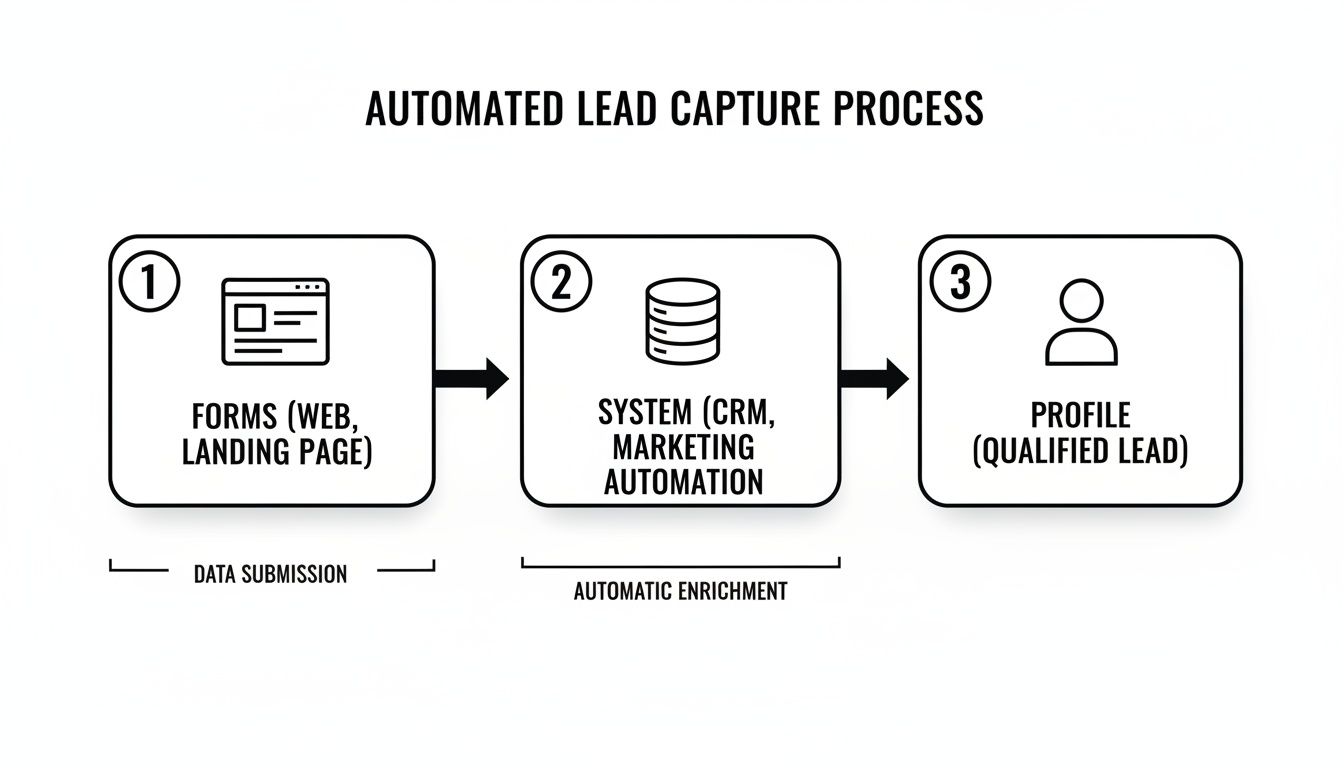
The takeaway here is that automation doesn't just capture the lead; it gets them ready for an intelligent, immediate handoff.
The Real Cost of Neglecting Lead Management
Getting your lead management process right isn't just a "nice-to-have" — it's a financial imperative. Think about it: 53% of marketers spend half or more of their entire budget just on generating leads. Without a system to handle that volume intelligently, you're just throwing money away. The numbers back this up. Companies that use AI for lead gen report over 50% more sales-ready leads and see costs drop by a massive 60%. This proves that smart scoring and routing are essential for getting a solid return on your marketing spend.
Automating Your Lead Routing Strategy
Okay, so a lead has hit your magic number—let's say 100 points—and is now officially a Sales Qualified Lead (SQL). What happens next? The final step is getting that hot lead into the hands of the right salesperson, instantly. We all know that speed is everything in sales; a slow response can kill a deal before it even starts.
Automated lead routing solves this. By setting up rules in your CRM, you can assign leads based on whatever criteria make sense for your business. For more on this, our guide on how to properly qualify B2B leads offers some deeper strategies.
Here are a few popular ways to route leads:
- Round-Robin: Simple and fair. Leads are dealt out evenly to a group of reps, like dealing a deck of cards. This prevents any one person from getting cherry-picked leads or being totally overloaded.
- Territory-Based: A classic for a reason. Leads are assigned based on geography—country, state, or even zip code. It’s perfect for teams with field reps or territory-specific knowledge.
- Product or Interest-Based: If you sell different products or services, route leads to the specialists. Someone who downloaded a whitepaper on "Product A" should go directly to the "Product A" sales team.
Pro Tip: Never just "toss a lead over the fence." Your automation shouldn't just assign the lead; it should also create a task for the rep that includes the lead's score, their recent activity, and any enriched data you’ve gathered. This gives the rep the context they need to have a meaningful first conversation.
When you combine smart scoring with automated routing, you build a powerful engine to manage your sales leads. It guarantees your sales team spends its time on the right opportunities and engages with the speed and insight needed to close the deal.
Designing Lead Nurturing Workflows That Convert
Let’s be honest: most of your new leads aren't ready for a sales call. If you're handing every fresh contact straight to your sales team, you're setting them up for a lot of wasted time and missed opportunities. The real magic in turning casual interest into actual revenue happens through smart lead nurturing—the art of building a relationship and staying top-of-mind until they're actually ready to buy.
This isn't about blasting out random "just checking in" emails. It's about building automated, strategic workflows that gently guide prospects along their buying journey with content that’s genuinely helpful. When you get this right, you're not just passively waiting for them to be ready; you’re actively helping them get there.
The numbers don't lie. Companies that get serious about nurturing generate 50% more sales-ready leads and cut their acquisition costs by a staggering 33%. And since nurtured leads are 47% more likely to make a larger purchase, it's a no-brainer for converting the vast majority of new leads that would otherwise go cold. You can dig into more of these powerful lead generation statistics on seoprofy.com.
Map Your Workflows to Real-World Behavior
Great nurturing starts with context. A generic, one-size-fits-all email blast is just noise. Your workflows need to be triggered by what people actually do, so every message feels timely and relevant.
Think about all the different ways someone might enter your world and build a unique sequence for each. Here are a few classic examples I've seen work time and again:
- The Welcome Series: Kicks off the moment someone subscribes to your blog or downloads a top-of-funnel guide. This is your first, best chance to make a great impression.
- The Re-Engagement Campaign: Designed for leads who've gone quiet for 60 or 90 days. The goal is to gently pull them back in or, failing that, clean up your list.
- The Topic-Specific Drip: Perfect for someone who just attended a webinar on a specific feature. You can immediately follow up with deeper content on that exact topic, keeping the momentum going.
Each of these scenarios calls for a completely different tone, different content, and a different end goal. When you segment your approach like this, you meet people where they are instead of trying to force them down a single path.
Building a Welcome Series That Actually Works
Let's walk through a real-world example. Imagine a new lead just downloaded your PDF, "The Ultimate Guide to B2B Project Management."
Your Goal: Introduce your brand, deliver more value on project management, and subtly nudge them toward considering your solution—without being pushy.
The Workflow:
- Email 1 (Immediately): Deliver the goods. This email is all about providing value, period. A simple "thanks for your interest" and a direct link to the guide is all you need.
- Email 2 (2 Days Later): Share a related, high-value blog post, maybe something like "5 Common Project Management Mistakes and How to Avoid Them." You're reinforcing your expertise, not pitching.
- Email 3 (4 Days Later): Bring in some social proof. Share a short customer success story showing how a similar company crushed their project management challenges using your product.
- Email 4 (7 Days Later): Mix up the format. Maybe you invite them to an upcoming webinar or share a link to a quick video demo. This caters to different learning preferences.
- Email 5 (10 Days Later): Now, you can make a soft call-to-action (CTA). This is where you might ask if they have questions or offer a no-pressure, 15-minute chat to discuss their specific challenges.
This kind of sequence educates before it ever tries to sell, building trust with every single send.
A great nurturing workflow feels less like a marketing campaign and more like a helpful conversation. It anticipates the prospect's next question and provides the answer before they even have to ask.
The Power of Personalization and Dynamic Content
If you really want your nurturing to convert, you have to go beyond the basics. This is where you put all that great data in your CRM to work.
Dynamic content is a game-changer here. It allows you to swap out specific parts of an email—a headline, an image, a case study, a CTA—based on who's receiving it. For example, a lead you know is in the manufacturing industry sees a case study from a factory, while a lead in tech sees one from a software company.
Here’s how you can put this into practice:
- By Job Title: A CEO gets content focused on ROI and big-picture strategy. A project manager gets tips on team productivity and smooth implementation.
- By Industry: Use the language, examples, and pain points that are specific to their world. It shows you've done your homework.
- By Behavior: Has a lead been poking around your pricing page? That's your cue to send an email that tackles common pricing questions or offers a link to an ROI calculator.
This level of detail makes your communication feel like it was written just for them, which dramatically boosts engagement. It’s the difference between being another email in their inbox and being a trusted advisor.
Mastering the Handoff from Marketing to Sales

This is where the rubber meets the road. You can have the slickest lead scoring model and the most brilliant nurture campaigns, but if the pass-off from marketing to sales is fumbled, great leads simply vanish. This is the moment of truth where friction, confusion, and dropped balls cost businesses real money.
A seamless transition makes sure every sales-ready lead gets the fast, intelligent follow-up they expect. It’s all about turning a lead’s digital journey into a personal conversation without missing a beat. This takes clear rules and the right automation to make it happen flawlessly, every single time.
Establishing Your Service Level Agreement
The bedrock of a solid handoff is a Service Level Agreement (SLA). This isn't just stuffy corporate jargon; it’s a straightforward, documented promise between marketing and sales that sets the rules of engagement. An SLA kills ambiguity and stops the blame game before it can even start.
Your SLA should nail down the answers to two crucial questions:
- When does sales take over? Your lead score defines this moment. For example, any lead hitting a score of 100 or filling out a "Request a Demo" form is officially an SQL and gets passed to sales.
- How quickly must sales act? Speed is everything. Your SLA needs a concrete timeframe for the first follow-up attempt, like "within one hour" for those high-intent leads.
Without this clear agreement, marketing is just throwing leads over the wall and hoping for the best, while sales lacks a true sense of urgency. This simple document gets both teams rowing in the same direction, focused on the shared goal of turning interest into revenue.
Automating the Handoff with Your CRM
Once your SLA is in place, your CRM becomes the engine that actually enforces it. Trusting someone to manually check a list and forward an email is a recipe for failure. Automation makes the handoff instant and, just as importantly, packed with context.
A typical handoff workflow inside your CRM should look something like this:
- The Trigger: A lead's score blows past the 100-point threshold.
- Immediate Actions: The CRM instantly changes the owner of the lead record from a general marketing queue to a specific sales rep, following your routing rules.
- Notifications: The assigned rep gets an immediate ping via email or Slack, with a direct link to the new lead's profile.
- Task Creation: The system automatically creates a "Follow Up with New SQL" task for that rep, with a due date set by your SLA (e.g., in one hour).
This automated process removes human error and lag time. The second a lead raises their hand, the right salesperson knows it and has an actionable task on their plate.
The handoff isn't just about passing a name and email. It's about transferring intelligence. The sales rep needs the full story—every page visited, every email opened, and every piece of content downloaded—to have a relevant first conversation.
Transferring Critical Lead Context
A name in an inbox isn't a lead; it's an admin task. To truly manage sales leads effectively, the handoff has to include all the rich context marketing worked so hard to gather. Your sales team needs to see the "why" behind the qualification.
Your CRM should give them a complete, chronological timeline of the lead's entire journey. Before even thinking about picking up the phone, a rep should see:
- Lead Score Breakdown: Why did they qualify? Was it because they hit the pricing page three times, or because their firmographic data is a perfect match?
- Engagement History: Which emails did they actually open? What blog posts did they read? Did they sit through that whole webinar last Tuesday?
- Key Data Points: What’s their job title, company size, and industry?
This is the intel that turns a cold call into a warm, helpful conversation. Instead of a generic, "So, what do you do?" the rep can open with, "I saw you downloaded our guide on project management for manufacturers. What are the biggest challenges you're running into there?" That’s how you build instant credibility and shrink the sales cycle from the very first touch.
Measuring Success and Optimizing Your Process
You can't improve what you don't measure. A structured process to manage sales leads is only as good as your ability to track what’s working and what isn’t. This is where we move beyond guesswork and focus on the numbers that truly matter to the health of your sales engine.
Tracking the right data is how you spot bottlenecks, justify your marketing spend, and make smart decisions that actually grow the business. The best way I’ve found to do this is by building a simple, no-nonsense dashboard right in your CRM to keep these vital signs front and center.
Key Metrics for Lead Management Success
While every company’s needs are a bit different, there are a few core KPIs that are non-negotiable. Don’t get bogged down in a sea of data; start by obsessing over these essentials:
-
Lead-to-Opportunity Conversion Rate: This is the big one. It’s a raw look at what percentage of your marketing-qualified leads (MQLs) sales actually accepts as legitimate sales opportunities (SQLs). If this number is low, it’s a classic sign that marketing and sales aren't aligned on what a "good lead" looks like.
-
Sales Cycle Length: How long, on average, does it take to get from that first handshake to a signed contract? Knowing this helps you forecast revenue more accurately and, more importantly, pinpoint the exact stages where deals seem to get stuck in the mud.
-
Revenue by Lead Source: Where are your best customers really coming from? When you discover that leads from industry webinars close at twice the rate of your paid search ads, you know exactly where to allocate your next dollar.
It’s a bit shocking, but 63% of sales managers admit their organization does a poor job of managing its pipeline. This isn’t just a small operational snag; it's a direct hit to your bottom line. Companies that nail this grow 28% faster than their competitors.
Building Your Optimization Cadence
Collecting data is pointless if you don't do anything with it. The final piece of the puzzle is establishing a regular rhythm for review and refinement.
Get a recurring meeting on the calendar—maybe bi-weekly or monthly—with both sales and marketing leadership. Pull up your dashboard and have an honest conversation about the numbers. If you need more ideas for shoring up your process, our complete guide explains how to manage your sales pipeline from start to finish.
This is the feedback loop that turns a static process into a living, breathing system that gets smarter over time. By consistently measuring what works and fixing what doesn't, your ability to manage leads transforms from a daily chore into a real competitive edge.
Got Questions About Managing Sales Leads? You're Not Alone.
Even with the best playbook, you're going to hit some snags. Fine-tuning your lead management process is an ongoing job, and questions always come up along the way. Let's tackle some of the most common ones I hear from teams, so you can turn those sticking points into confident, decisive action.
Where Do I Even Start to Get a Handle on My Leads?
Before you can think about scoring, routing, or nurturing, you have to get all your leads in one place. That's it. That's the first, most critical step. Centralize every single lead source into your CRM.
Whether a lead comes from a webinar, a website form, a trade show badge scan, or a LinkedIn message, it needs to land in the same system. This simple move stops hot prospects from dying in a random spreadsheet or getting forgotten in someone's inbox. It's the foundation for everything else—without a single source of truth, you're just guessing.
I've seen it time and again: the single biggest mistake companies make is not having a formal, documented handoff process between marketing and sales. Without it, you get disagreements on what a "good" lead is and no accountability for follow-up. That's how deals fall through the cracks.
How Often Should My Reps Actually Follow Up?
You have to be fast. I mean, really fast. The data doesn't lie: contacting a new lead within the first five minutes can increase your chance of qualifying them by more than 20 times. Your first touchpoint needs to be immediate, and you should absolutely automate it.
After that initial contact, the key is to be persistent without being a pest. A good cadence looks something like this:
- The First Two Weeks: Plan for about 5-7 touchpoints. Mix it up with calls, emails, and maybe a social media connection.
- Always Add Value: Never, ever just "check in." Every single interaction should offer something useful—a relevant case study, a helpful blog post, an industry insight.
This approach keeps your name at the top of their list without driving them to hit the unsubscribe button.
What Are the Most Important KPIs to Track?
You can measure a million different things, but that just creates noise. Focus on the metrics that actually tell you if you're making money and being efficient. Your main dashboard should give you a clear, immediate pulse on the health of your pipeline.
If you're just starting out, nail these three essentials:
- Lead-to-Opportunity Rate: This tells you the quality of your leads. What percentage of the leads marketing sends over does sales actually accept and turn into a real opportunity?
- Sales Cycle Length: How long does it take, on average, to close a deal from the very first conversation? This is a huge indicator of your sales efficiency.
- Revenue by Lead Source: Where are your best customers really coming from? This helps you double down on what's working and cut what's not.
Keeping a close eye on these numbers is how you spot bottlenecks before they become major problems. It's how you stop guessing and start making smart, data-driven decisions.