Here's what happens when your business phone and your CRM start talking to each other: your phone system instantly knows who’s on the other end of the line and why they’re calling. The integration automatically logs every call, pulls up the customer’s entire history in a flash, and lets your team dial contacts with a single click. It’s about turning two separate tools into one incredibly powerful communication hub.
The goal is simple: save time, improve conversations, and close more deals.
Why CRM and VoIP Integration Matters Now More Than Ever
In any business conversation, context is king. Is the person calling a brand-new lead, a loyal client with an open support ticket, or a high-value account that’s about to sign on the dotted line? Without an integrated system, your team is flying blind. They're left scrambling through browser tabs, trying to piece together the customer's story while the customer waits. That little bit of friction leads to wasted time, frustrated people, and lost opportunities.
A CRM and VoIP integration completely changes that dynamic. It tears down the wall between your phone system and your customer data, giving you a single source of truth for every single interaction.

Unifying Customer Conversations
Think about it from your sales rep's perspective. A call comes in. Instead of just seeing a phone number, their screen immediately pops up with the caller’s entire CRM profile—their company, current deal stage, recent support tickets, and notes from past conversations. This gives them the context they need to have a smarter, more personal conversation from the first hello.
This isn’t just a nice-to-have feature; it’s a real strategic advantage. It gives your teams the ability to:
- Automate the Busywork: Every call, including its duration and outcome, gets logged in the CRM automatically. No more manual data entry.
- Boost Team Collaboration: Sales, support, and account managers all see the exact same customer history, which means everyone is on the same page and the customer experience is seamless.
- Deliver Proactive Service: A support agent can glance at a caller’s purchase history and anticipate their needs before they even finish explaining the problem.
The real win here is shifting from a reactive to a proactive way of communicating. You stop just answering calls and start continuing a relationship, armed with the full history of every touchpoint.
A Data-Backed Approach to Efficiency
The impact of connecting these systems is huge, and the numbers prove it. By 2025, integrating VoIP and CRM has become standard practice for a reason. More than 55% of enterprises globally now use VoIP tied into tools like a CRM to make better decisions. Even more telling, contact centers that make this move report up to a 30% improvement in first-call resolution rates. That’s a direct line to happier customers.
This integration transforms your phone from a simple tool into an intelligent data-gathering machine. These capabilities are especially critical for companies in the communications space, and you can learn more about a CRM for telecommunications in our detailed guide. At the end of the day, it's all about making every single conversation count.
Laying the Groundwork for a Smooth Integration
Jumping headfirst into a tech project without a plan is a recipe for disaster. A successful CRM and VoIP integration starts long before you write a single line of code or connect any software. This initial planning is all about making sure your tech, your team, and your business goals are perfectly aligned. The whole point is to solve real problems, not create new ones.
First things first, you need to take a hard look at the tools you're already using. The single biggest hurdle you might face is API compatibility. Think of an API (Application Programming Interface) as the translator that lets your CRM and VoIP system talk to each other. If they can't speak the same language, the integration becomes a complex, expensive nightmare—if it's even possible.
Most modern cloud-based platforms have solid APIs, but you can't just assume. Dig into the developer documentation for both your CRM and your VoIP provider. If that's not your cup of tea, just ask their support teams a direct question: "Do you have a well-documented REST API for third-party integrations?" That one question can save you a world of hurt later.
Define Your Integration Needs Clearly
Once you know the tech will play nice, it's time to get specific about what you actually want this integration to do. Vague goals like "improve efficiency" won't cut it. You need to map out the exact data and workflows that will make a difference for your team.
Get your key people in a room—someone from sales, customer support, and IT—and start asking the right questions.
- What data needs to sync? Are we just talking about call logs and outcomes, or do we need full call recordings, agent notes, and maybe even custom data fields to move between systems automatically?
- What should be automated? Should a missed call from an unknown number instantly create a new lead in the CRM? When a deal is marked "closed-won," should it trigger a follow-up task?
- What should the user see? Do your agents need a "screen pop" that shows them a caller's entire history before they even say hello? Is having a click-to-call button inside the CRM a non-negotiable?
Answering these questions gives you a clear blueprint. It ensures the integration is built around the daily grind of the people who will be using it most. This is a core principle we follow when developing any customized CRM software.
Align Your Teams from Day One
One of the most common mistakes I see is companies treating this as a purely IT project. It's not. A CRM and VoIP integration is a business-wide initiative that directly impacts how your sales and support teams operate. Getting their input and buy-in from the get-go is essential.
Your sales reps know exactly where the friction is in their follow-up process. Your support team knows precisely what piece of information they need to solve a customer's problem on the first call. Their real-world insights are gold for designing workflows that actually boost productivity and make customers happier.
A successful integration isn’t just about making two systems talk. It’s about empowering your people with the right information at the right time to have better conversations. Without their input, you’re just connecting wires.
This collaborative approach makes sure the final product is not only technically sound but also something your team is excited to use. It shifts the project from being a technical chore to a strategic move that delivers real results. The VoIP market is exploding—forecast to hit over $415 billion by 2034—and it's these powerful integrations with tools like CRMs that are fueling that growth. You can see more fascinating data on this over at SQ Magazine.
Connecting Your Systems The Right Way
Okay, you've done the prep work. Now for the exciting part: actually connecting your CRM and VoIP platforms. This is where all that planning pays off, turning two separate tools into one cohesive, intelligent system for your sales team. The great news is you don't need a computer science degree to get this done. There are a few different ways to approach your CRM and VoIP integration, and we'll walk through which one is right for you.
The path you choose really comes down to what you need to accomplish, your team's comfort level with technology, and how complex you want your automated workflows to be.
This diagram lays out the essential planning steps you should have completed before you start plugging things in.
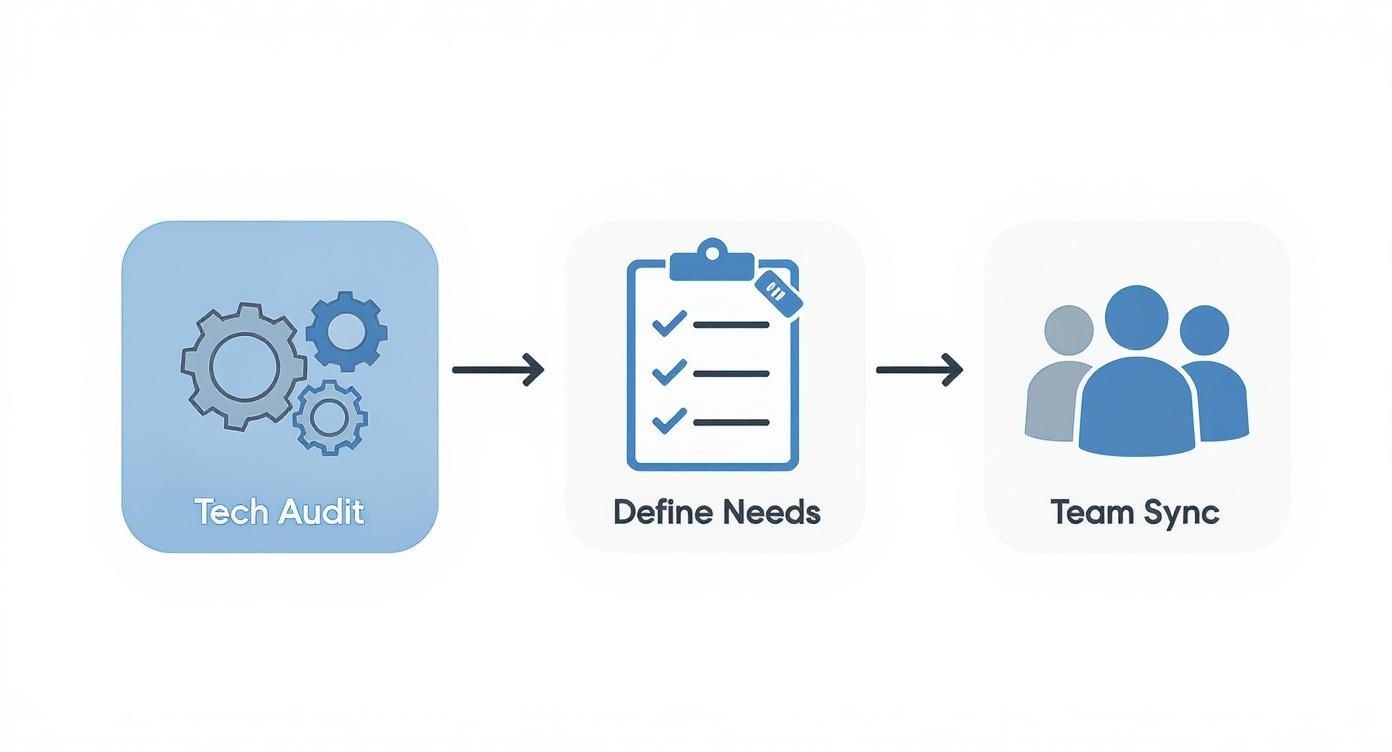
It’s a good reminder that a successful technical setup is built on a solid foundation of auditing your tech, defining your business goals, and getting everyone on the same page.
Choosing Your Integration Method
The first big decision is how you're going to make the connection. There are generally three ways to do this, and understanding the trade-offs will help you pick the most effective and budget-friendly option.
Comparing Your Integration Options
To make the right choice, it helps to see the main methods side-by-side. Each has its place, from simple plug-and-play connections to fully customized solutions. This table breaks down what to expect from each approach.
| Integration Method | Technical Skill Required | Flexibility | Best For |
|---|---|---|---|
| Native Integration | Minimal (point-and-click) | Low | Teams needing a quick, simple, and officially supported connection for core features. |
| Third-Party Connector | Low (visual, no-code interface) | High | Businesses that want to build multi-step, custom workflows without hiring a developer. |
| Custom API Development | High (requires a developer) | Very High | Organizations with unique, complex requirements that off-the-shelf solutions can't meet. |
Ultimately, the best method is the one that solves your specific problems without creating unnecessary complexity or cost. Start with the simplest option that meets your needs and only move to more complex solutions if you hit a clear roadblock.
A Closer Look at Your Choices
Let's dive a little deeper into what each of these methods actually looks like in practice.
1. Native Integrations (The Easiest Path)
Think of this as the "plug-and-play" option. Most modern CRM and VoIP providers, like RingCentral and Salesforce, have built-in connectors designed to work together right out of the box. You'll usually find them in your platform's app store or marketplace. They're fantastic for getting the basics—like call logging and click-to-dial—up and running in minutes. The downside? They can be rigid. You're limited to the features the provider decided to build, which might not cover every single one of your team's specific needs.
2. Third-Party Connectors (The Flexible Middle Ground)
This is where tools like Zapier, Make, or Tray.io really shine. They act like a universal translator between your apps. You can create custom "recipes" or workflows that say, "When this happens in my phone system, do that in my CRM." The flexibility here is huge. You can build very specific, multi-step automations that most native integrations just can't handle, all without writing a single line of code. Just be mindful that these tools have their own subscription costs, and there might be a very slight delay in data syncing.
3. Custom API Development (The Power User's Choice)
If you have truly unique needs—like syncing custom data fields or building a bespoke interface right inside your CRM—then a direct API integration is your answer. This means hiring a developer to write code that connects the two systems' APIs. You get total control and a solution that's perfectly tailored to your business. However, this is easily the most expensive and time-consuming route. It also means you're on the hook for ongoing maintenance whenever one of the platforms updates its API.
Mastering Data Mapping: The Heart of Automation
Once you've picked how you'll connect your systems, the next crucial step is data mapping. This is simply the process of telling the integration which piece of information in your VoIP system corresponds to which field in your CRM.
This is where the magic really happens. It’s how the integration knows what to do with the call data.
Think of it this way: you have to define the rules of the road. A "Missed Call" in your phone system needs to be translated into a specific action, like "Create a New Task for the contact owner" in your CRM.
Here are a couple of real-world examples of how you can map data to create powerful automations:
-
Scenario: A call comes in from an unknown number.
- Mapping: Map the caller's phone number to the "Phone Number" field of a new record.
- Action: Automatically create a new Lead in the CRM.
- The Result: No more lost leads from random inbound calls. Your team has a record to follow up on instantly.
-
Scenario: A sales rep finishes a call and selects the "Discovery Call Complete" call disposition in their VoIP dialer.
- Mapping: Link the call disposition to a CRM field.
- Action: Automatically update the Deal Stage in the CRM to "Qualified."
- The Result: Your sales pipeline is always 100% accurate in real-time, and your reps don't have to waste time on manual data entry.
Key takeaway: The main goal of data mapping is to hunt down and eliminate manual steps. If a sales rep has to do anything repetitive after a call, you've found a perfect opportunity for automation.
Building Workflows That Drive Real Results
Okay, you've connected your CRM and VoIP systems. The technical part is done, but the real fun is just getting started. This is where you transform that simple connection into a powerhouse for your business by building automated workflows that directly impact your bottom line.
Think of the integration as a bridge. The workflows are the traffic—the sales calls, support tickets, and follow-ups—that drive revenue and keep customers happy. Let's dig into some practical, high-impact examples you can set up right away.

Supercharging Your Sales Team Workflows
For any sales rep, time is money. Every second they waste manually dialing numbers or switching between apps is a second they aren't selling. These workflows are all about killing that administrative drag so they can focus on what they do best: building relationships and closing deals.
Workflow 1: Click-to-Call Right From the CRM
This is usually the first workflow teams build, and for good reason. It’s incredibly simple but has a massive impact.
- The Trigger: A sales rep clicks a contact’s phone number inside the CRM.
- The Action: The VoIP system instantly dials that number on the rep's phone. At the same time, the CRM opens a new call log activity and automatically ties it to that contact's record.
- The Payoff: Manual dialing is gone. This not only saves a ton of time but also gets rid of frustrating dialing errors. Your team can fly through their call lists, and every single touchpoint is logged perfectly without a second thought.
Workflow 2: Automated Follow-Up for Missed Calls
Leads should never fall through the cracks just because someone couldn't pick up the phone. This automation acts as a safety net.
- The Trigger: An inbound call from a known lead or contact goes unanswered.
- The Action: The system automatically creates a new "Callback" task in the CRM, assigns it to the contact's owner, marks it as high priority, and sets the due date for the same day.
- The Payoff: You guarantee a prompt follow-up, which is huge for the customer experience. You get back to warm leads before they go cold, dramatically increasing your chances of connecting.
By automating these small but critical tasks, you're not just saving a few seconds here and there. You're building a more reliable and disciplined sales process that directly influences your pipeline's health and velocity.
Empowering Your Support Team Workflows
When it comes to customer support, context is king. A frustrated customer doesn't want to explain their problem three different times to three different people. These workflows give your agents the right information at the right time.
Workflow 3: Intelligent Call Routing
This is where you use your CRM data to make your phone system smarter. The goal is to get the customer to the right person on the very first try.
- The Trigger: An inbound call comes in from a number that matches an existing customer in the CRM.
- The Action: Instead of dumping the call into a generic queue, the system checks the "Contact Owner" field in the CRM and routes the call directly to that customer's dedicated account manager or support specialist.
- The Payoff: You deliver a premium, personalized experience. It slashes wait times and eliminates the "let me transfer you" shuffle, leading to better first-call resolution rates and happier customers.
Workflow 4: Voicemail-to-Ticket Creation
Your support shouldn't just stop when the office closes. This workflow makes sure after-hours issues are captured and ready for action the next morning.
- The Trigger: A customer leaves a voicemail on the main support line.
- The Action: The integration transcribes the voicemail to text. It then creates a new support ticket in the CRM, automatically filling it with the caller's info, the transcription, and a link to the audio recording.
- The Payoff: Nothing gets lost in the shuffle. When your team logs in, they have a clean, documented queue of tickets waiting. This makes handling after-hours requests faster and far more organized. For more ideas on organizing your sales process, check out our ultimate guide to B2B pipeline management.
These four workflows are just scratching the surface. The real power of a CRM and VoIP integration is its flexibility. You can customize it to fit your unique business processes, turning repetitive daily chores into seamless, automated actions that deliver real, measurable results.
Getting Your Team Ready: Testing and Training
You’ve connected the systems, and technically, everything is talking to each other. That’s a huge win, but we're not at the finish line just yet. A truly successful CRM and VoIP integration is one your team actually wants to use. This last leg of the journey—solid testing and smart training—is what makes the difference between a project that’s just "done" and one that actually transforms your workflow.
It’s about more than just making sure calls get logged. You need to walk through the entire experience from your team’s perspective. This is where you catch the little snags and friction points before they become daily frustrations for everyone.
Building a Real-World Testing Plan
Before you roll this out company-wide, pump the brakes and run a small pilot. I always recommend grabbing one or two of your most engaged sales reps and maybe a super detail-oriented support agent. Their mission? To try and break things and give you brutally honest feedback.
Hand them a checklist of real-world scenarios to run through:
- The Returning Customer Call: An inbound call comes from an existing client. Does their contact record pop up on the screen instantly? No delays?
- The One-Click Outbound: When they click a phone number in the CRM, does it actually launch the call in the softphone without a fuss?
- The Mystery Caller: A call comes in from a number not in your system. How easy is it for the user to create a new lead or contact on the fly?
- The Call Recording Check: A few minutes after a call ends, is the recording link already sitting nicely in the CRM activity log?
- The Automation Test: If a rep selects a call outcome like "Meeting Booked," does it fire off the correct automation—like creating a follow-up task for three days later?
This pilot team is your early warning system. They'll spot confusing UI elements or clunky steps while it's still easy to fix them.
Don’t just ask your pilot group, "Did it work?" The real question is, "How did it feel to use?" Their feedback on the small stuff is what leads to a much smoother launch for everyone else.
Training That Actually Sticks
Once you’ve smoothed out the rough edges, it’s time to get the whole team on board. Your goal here isn't to turn them into IT experts. It's to make them feel confident and fast using the new setup. Drowning them in technical details is the quickest way to kill adoption.
Your training should be practical, focused, and easy to digest.
-
Run a Hands-On Workshop: Ditch the PowerPoint slides. Get everyone on a call and have them perform the core tasks themselves. Guide them through making a click-to-call, logging a disposition, and finding a call recording. Doing it live builds muscle memory way better than watching someone else do it.
-
Build a One-Page Cheat Sheet: Let's be honest, no one is going to read a 50-page manual. Create a simple, visual, one-page guide covering the 5 most common things they'll do every day. Use screenshots. This will live on their desktops for weeks.
-
Record Bite-Sized Videos: Film a few 2-3 minute screen-share videos showing how to handle specific scenarios, like "What to do when a call comes from a new prospect." These are perfect for a quick refresher and invaluable for training new hires later on.
-
Appoint an Integration Champion: Pick one person on the team to be the go-to expert for any questions. This gives your team a clear, friendly face to turn to for help and shows them you're there to support them as they get used to the new way of working.
Common Questions About CRM and VoIP Integration
Let's be honest, taking on any new tech project brings up a lot of questions. Integrating your CRM and phone system is no different. I've been through this process with countless businesses, and a few key questions always pop up. Here are the straightforward answers you're looking for.
How Much Is This Going to Cost Me?
The price tag for a CRM and VoIP integration can swing wildly, but it's often more affordable than you'd expect. The final cost really boils down to how you connect the two systems.
The most budget-friendly route is usually a native integration. If your CRM or VoIP provider offers a pre-built connection, it’s often included in your current subscription. No extra cost, just a bit of setup.
If you go with a third-party tool like Zapier, you'll have a separate subscription fee. These services typically charge you based on how many automated tasks you run each month. The most expensive path is a full custom API development, which means paying developers to build and maintain a unique connection just for you.
My advice? Start with the simplest, cheapest option that gets the job done. You can always upgrade to a more complex solution as your needs evolve. Don't over-engineer it right out of the gate.
How Secure Is My Customer Data with This Setup?
This is a big one, and rightly so. The good news is that modern platforms are built with security as a top priority. When you’re working with reputable CRM and VoIP providers, your data is protected by multiple safeguards.
- Encryption: Your data is scrambled and secured both while it's traveling between the systems (in transit) and when it's being stored on servers (at rest).
- Access Controls: Both your CRM and phone system should have granular permission settings. This lets you decide exactly who on your team can see or do what with customer information.
- Compliance: Always check if your providers comply with major privacy laws like GDPR and CCPA. This is a strong indicator that they adhere to strict data handling standards.
Before you connect anything, take a few minutes to review the security and privacy policies for both of your providers. It's time well spent.
Can I Connect Any VoIP System to Any CRM?
Not always, but the odds are definitely in your favor. Most cloud-based VoIP and CRM platforms these days are built to play nicely with other software. The first place you should look is your provider's app marketplace or integration directory. This will show you every pre-built, "plug-and-play" connection they offer.
For instance, our B2B CRM was designed with an open API, which makes connecting to a huge variety of popular VoIP systems much easier. If a native integration doesn't exist for your specific tools, a third-party connector can almost always act as the middleman to get them talking.
What's the Best Way to Measure the ROI on This?
You don't need a complex spreadsheet to see the payoff. Measuring the return on this investment is all about tracking real-world improvements in your team's efficiency and effectiveness.
The key is to grab a baseline of a few key metrics before you flip the switch on the integration:
- Time Wasted on Data Entry: How many minutes does each rep spend manually logging call notes every day? After the integration, this number should plummet to near zero.
- Average Handle Time: How long does a support agent typically spend on a call to solve a customer's problem? With a customer's entire history popping up on their screen, this time should drop.
- Outbound Call Volume: How many dials can a salesperson realistically make in an hour? With click-to-dial, that number should jump significantly.
By comparing the "before" and "after" on simple metrics like these, you can clearly show the tangible value the CRM and VoIP integration is delivering. The time saved and the productivity boosts will make the initial setup effort well worth it.